
Voice recognition is technology that converts spoken words into text or commands that computers can understand and act on. Its modern history includes IBM's Shoebox demonstration in 1962, Carnegie Mellon's Harpy system reaching 1,011 words in 1976, and Dragon Dictate becoming a consumer product in 1990.
You may be sitting in a busy restaurant, a meeting, a classroom, a church service, or a doctor's office right now, trying to catch every word. Voice Dictation: iScribe for iPhone by Harshva Technologies Private Limited provides real-time captions on iPhone and iPad so d/Deaf and hard-of-hearing people can follow spoken conversations, sermons, meetings, cafes, and Bible studies without guessing at missed words.
Table of Contents
- What Voice Recognition Actually Does for You
- How Your Voice Becomes Text on a Screen
- Voice Recognition for Accessibility and Daily Life
- From Lab Prototypes to Modern Transcription Apps
- What Affects Voice Recognition Accuracy
- Choosing the Right Voice Recognition Tool
What Voice Recognition Actually Does for You
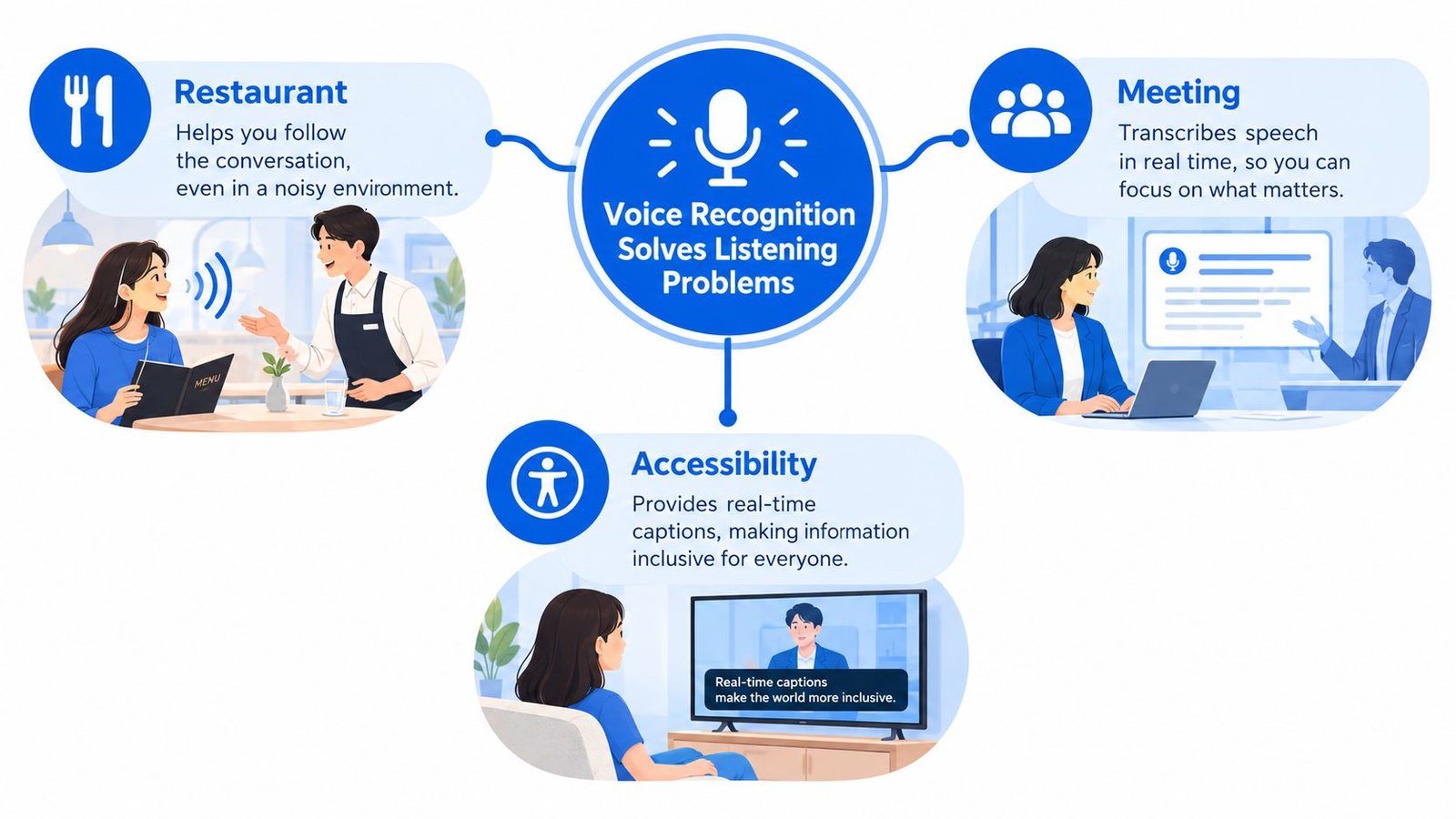
Suppose several people are talking in a busy restaurant. You can see their faces, but background sound makes parts of the conversation difficult to follow. Voice recognition helps by turning spoken language into readable text while people are speaking.
The simplest answer to what is voice recognition is this: it's a system that listens to speech, identifies the words, and produces text or a command. In practical terms, it acts as a translator between human speech and computer processing.
From sound to useful information
The process usually follows a few connected steps:
- The microphone captures speech. Your voice creates sound waves, and a phone, computer, or other device records those waves.
- Software analyzes the sound. The system looks for patterns that match speech sounds.
- A recognition engine predicts words. It uses known language patterns to decide which words most likely fit the sounds and the surrounding sentence.
- The device displays or acts on the result. It may show captions, save a transcript, or carry out a spoken command.
That output can support everyday convenience, but accessibility gives it a deeper purpose. A person who is Deaf or hard of hearing may use live captions to follow a staff meeting, a lecture, a family conversation, a religious service, or an appointment without depending on another person to repeat or summarize everything.
The distinction between voice recognition and speech-to-text can cause confusion. Voice recognition is the broader idea. It can produce written words or interpret a command such as opening an application. Speech-to-text focuses specifically on converting spoken language into text. A useful plain-language explanation is available in Voice Control Pro's guide to speech recognition.
Live captions are especially valuable because they reduce the delay between speaking and understanding. A user can read the conversation as it unfolds instead of waiting for notes afterward. Learn more about the role of this format in real-time closed captioning.
How Your Voice Becomes Text on a Screen
When you speak into a phone, the device doesn't understand language in the same way a person does. It first receives a physical signal, turns that signal into data, and then uses software to estimate the words that fit the sound.
The recognition process
First, sound enters the microphone. Your voice produces changes in air pressure. The microphone detects those changes and converts them into an electrical signal. The device then stores that signal as digital audio, which a computer can analyze.
Next, the system separates the audio into manageable pieces. It examines short portions of the recording rather than treating an entire conversation as one unbroken sound. The software looks at acoustic features, including pitch, tone, timing, and the transitions between sounds.
Then, an acoustic model matches sounds to language. An acoustic model is software that estimates which speech sounds correspond to the audio. It does not just search for one perfect sound. It weighs several possible interpretations because different words can sound similar.
A language model adds context. A language model is a system that estimates which words are likely to appear together. If a speaker says something that sounds like “meeting,” the surrounding words can help the software decide whether the sentence refers to a meeting, a greeting, or another similar phrase.
Finally, rapid decoding produces text. Decoding is the process of choosing the most likely sequence of words from the available possibilities. In a live captioning tool, the system repeats this process continuously, updating the text as new speech arrives.
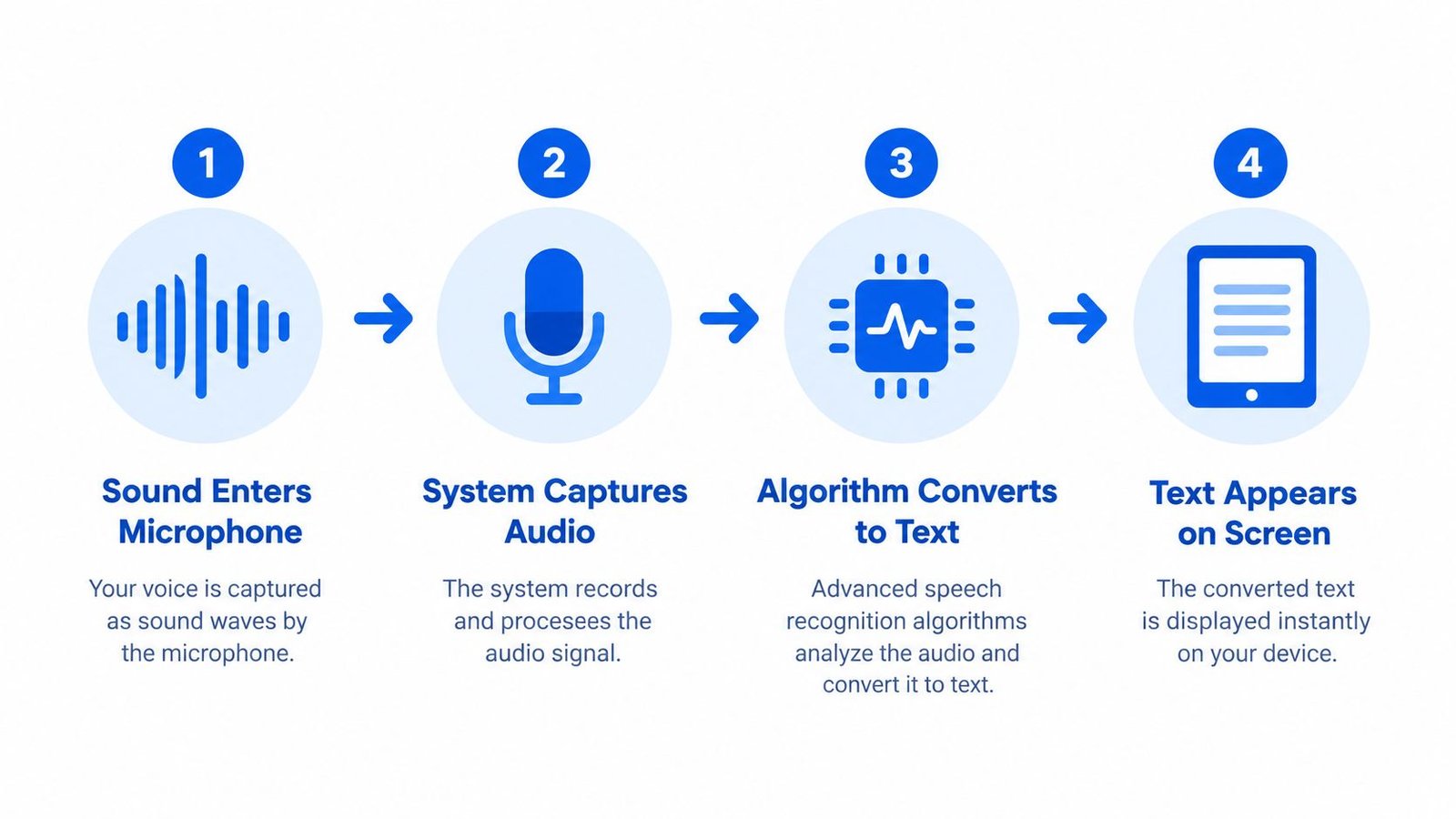
Practical rule: Clear speech gives the system better evidence. A nearby microphone, reduced background noise, and one person speaking at a time can make captions easier to follow.
The process is explained in more technical detail in this overview of voice recognition by AIDictation. For readers who want the broader workflow, audio transcription includes the related tasks of converting recorded speech into a written document.
Cloud-based recognition sends audio to remote computing systems for processing, so some tools need an active internet connection. A delay can also appear between speech and the words on screen. That delay matters in a fast conversation because captions that arrive too late are harder to use.
Live Transcribe iSrcribe is listed for iPhone and iPad and uses the phrase “See what's being said” in its App Store catalog description. The practical value of a tool like this is not only the transcript itself. It's the ability to keep spoken information visible while the conversation continues.
Voice Recognition for Accessibility and Daily Life
A live transcript can change whether someone participates independently or has to ask another person to fill in the gaps. In a classroom, captions can help a student follow a lecture. In a medical office, they can make instructions easier to review. In a church, they can help someone follow a sermon, prayer, Bible study, or group discussion.
The same principle applies outside formal settings. A person may use captions during a conversation at a cafe, while traveling, during a family gathering, or in a workplace discussion. The words on screen provide another path to meaning when hearing every speaker clearly is difficult.
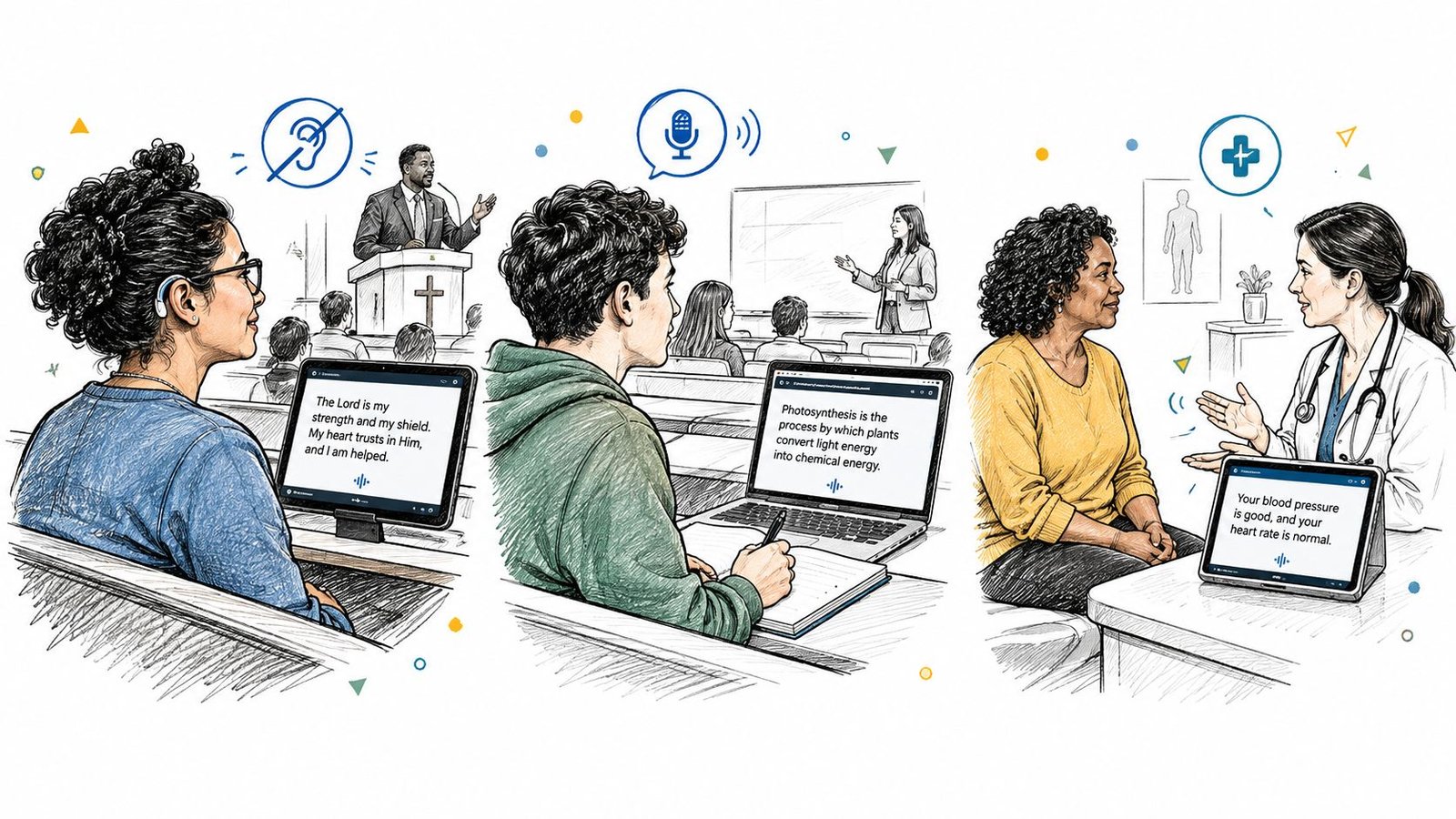
Different settings create different needs
Meetings require participation. A transcript can help someone follow fast exchanges, remember decisions, and identify questions that need an answer. Speakers should still face the person using captions and avoid talking over one another whenever possible.
Classrooms require continuity. A learner may need to read a sentence while also watching a demonstration or taking notes. Adjustable text size and clear screen presentation can make the information easier to use.
Appointments require precision. Names, instructions, and unfamiliar terms can be difficult to catch in any conversation. A saved transcript may help a person review what was discussed, although important medical, legal, or financial details should always be confirmed with the relevant professional.
Social conversations require flexibility. A captioning tool can reduce the need to interrupt with repeated requests. That can make casual interaction feel more natural, especially when several people are moving between topics.
The W3C accessibility guidance describes live captions as a service that can be delivered in person or remotely. It also identifies professional real-time captioning and Communication Access Realtime Translation, commonly called CART, as established approaches for meetings, lectures, and similar events. The U.S. Access Board's Section 508 guidance likewise recognizes real-time captions, whether automatically generated or provided through CART, as an accommodation for accessible meetings and live events.
Voice recognition doesn't remove every communication barrier. Speakers may overlap, a room may echo, and unusual names may be displayed incorrectly. Still, continuous text gives users immediate information and a way to check details later, which can support greater independence.
From Lab Prototypes to Modern Transcription Apps
Voice recognition began with limited systems that recognized a small set of spoken words or commands. IBM demonstrated the Shoebox machine at the Seattle World's Fair in 1962. The machine showed that speech could be connected to computer operations, even though early systems were far less flexible than today's transcription tools.
In 1971, DARPA launched the Speech Understanding Research program with a five-year funding effort aimed at a 1,000-word target. By 1976, Carnegie Mellon's Harpy system reached 1,011 words. These milestones showed the field moving from isolated demonstrations toward systems that could handle broader vocabularies.
The shift to consumer use
The next important change came in 1990, when Dragon Dictate became the first speech-recognition product sold to consumers. That moment marked a shift from laboratory prototypes to practical dictation for ordinary users. The field could now support a wider range of writing and productivity tasks.
Modern transcription apps build on that progression. Continuous speech recognition allows systems to process connected sentences rather than isolated words. Language modeling helps interpret context, and rapid decoding allows text to appear while a person is still speaking.
Those technical foundations support accessibility applications on mobile devices. Voice Dictation: iScribe, developed by Harshva Technologies Private Limited, is described in its App Store listing as an app for Deaf and hard-of-hearing users, as well as people who record meetings, lectures, appointments, and other conversations. Its role illustrates how speech technology has moved beyond convenience and into everyday communication support.
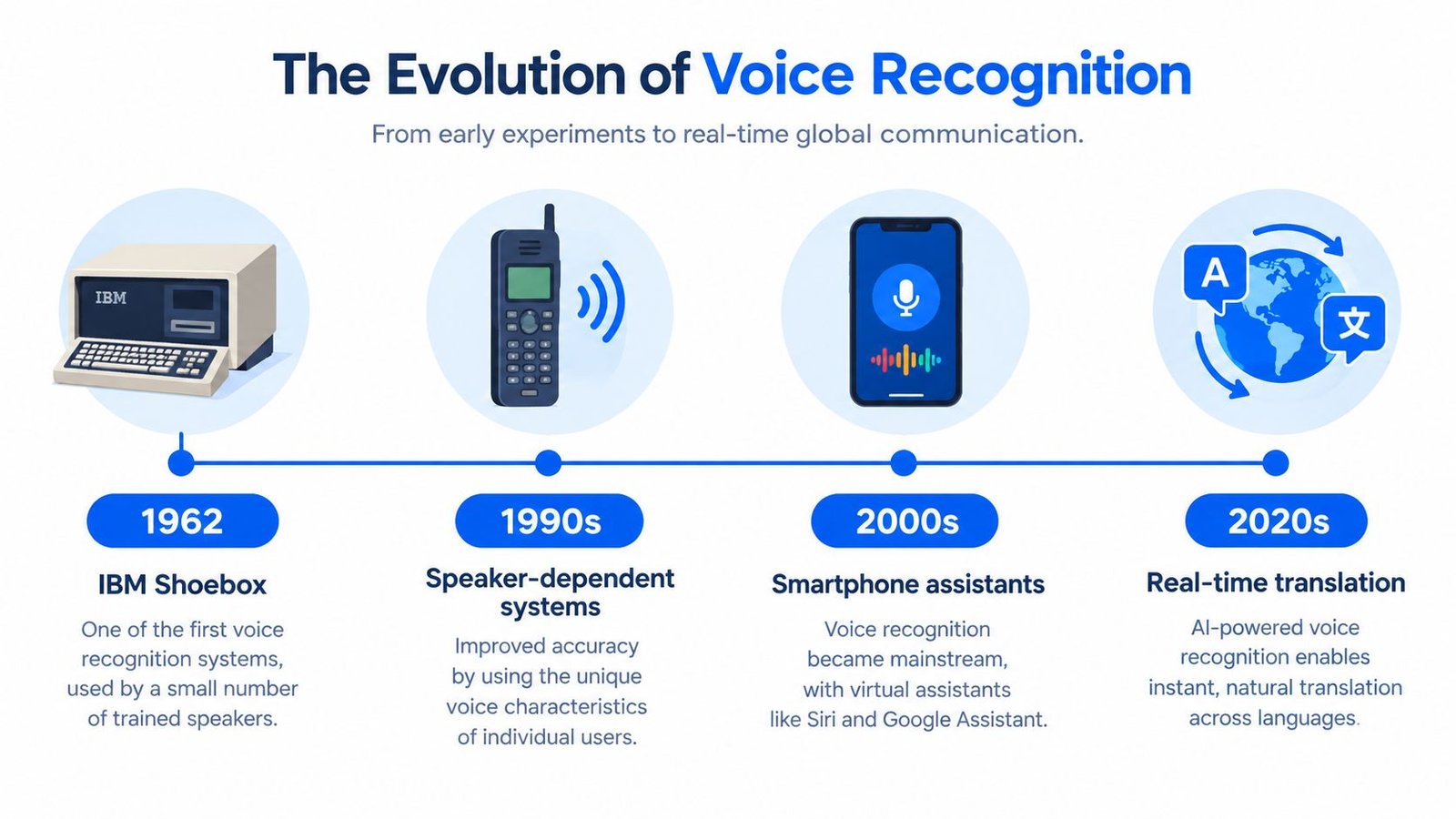
The broader market reflects this adoption. One estimate valued the global speech recognition market at USD 15.2 billion in 2025 and projected it to reach USD 53.81 billion by 2034, with a 15.08% compound annual growth rate, while another estimate placed the market at USD 20.25 billion in 2023 and projected USD 53.67 billion by 2030, at a 14.6% compound annual growth rate. These are separate industry estimates, so they should be read as projections rather than one definitive market measurement, as outlined in this speech recognition market analysis.
What Affects Voice Recognition Accuracy
A caption can be useful and still contain errors. The quality of the result depends on the audio, the speakers, the language, the room, and the speed at which the system must respond.
Noise changes the signal
Background noise competes with speech. In a busy restaurant, dishes and nearby conversations may overlap with the speaker's voice. In a meeting room, air conditioning and room echo can blur consonants. Reverberation, which is the persistence of sound after it reflects from walls and surfaces, can make words less distinct.
Controlled research has found that background noise can more than double Word Error Rate, or WER, compared with quiet conditions. WER measures the word-level difference between a reference transcript and the system's output. A lower WER indicates better recognition, but clean test data can make performance look better than it will in a real room. NIST guidance on speech data processing explains why low signal-to-noise conditions create substantial accuracy problems.
Language and conversation style matter
Accents, dialects, speech rate, and pronunciation can change the result. Code-switching, which means moving between languages during one conversation, adds another layer of difficulty. Reporting on multilingual voice recognition notes that Mozilla Common Voice covers only 14 African languages, representing less than 1% of the continent's linguistic variety. The same report describes a Ghana clinic system reaching 78% accuracy in Twi compared with 95% in English, while South African code-switching across 11 official languages can create latency spikes above 500 milliseconds. These figures appear in this voice recognition market discussion.
Latency is the time between spoken words and displayed captions. A system can achieve a strong score in a quiet benchmark and still frustrate users if captions arrive too late during natural turn-taking. A robustness review found that clean benchmark results can overstate deployment performance when audio includes noise, special effects, or other disruptions, as explained in this analysis of speech recognition robustness.
Useful comparison: Quiet, single-speaker audio is the easy case. A crowded, multilingual, fast-moving conversation is the demanding case.
For practical preparation, reduce competing sound, place the device near the main speaker, and ask participants not to speak simultaneously. A guide to removing background noise from audio can help when you're working with recorded files. For a broader discussion of speech recognition for language apps, compare results under conditions that resemble your actual use instead of relying only on a clean demonstration.
Choosing the Right Voice Recognition Tool
Start with the situation, not the feature list. A person attending a meeting may need live captions and saved transcripts. A student may prioritize readable text during a lecture. Someone recording an interview may care more about file transcription and later review.
Match the tool to the environment
Ask these questions before choosing:
- Where will you use it? A quiet office, crowded cafe, classroom, church, and medical office create different audio conditions.
- Who needs the captions? If the primary user is Deaf or hard of hearing, look for live display, readable typography, and controls that support sustained viewing.
- Do you need live or recorded transcription? Live captions support immediate participation. File transcription is more suitable when you can process audio after a conversation.
- Which languages and variants matter? Check support for the languages, accents, and code-switching patterns used by your household, class, or team.
- What happens to the audio? Review the privacy policy and product documentation to understand whether recordings are uploaded, stored, or deleted.
- Will it work on your device? Confirm compatibility with the iPhone, iPad, or other device you plan to use.
Readability deserves as much attention as recognition quality. Font size, contrast, spacing, and a stable text display can determine whether a user can follow a long conversation comfortably. Test the tool with realistic audio, including more than one speaker and the room where you expect to use it.
The App Store listing for Voice Dictation: iScribe describes the app as intended for Deaf and hard-of-hearing people and for users recording meetings, lectures, appointments, and other conversations. That description makes it relevant to readers evaluating accessibility-oriented captioning, but every user should still confirm current features, privacy terms, and device requirements before relying on an app for an important event.
For a broader look at the category, review guidance on real-time transcription software. The right choice is the tool that fits your communication needs, environment, language, device, and privacy expectations, not merely the one with the longest feature list.
iScribe Live Transcribe offers live, word-by-word captions on iPhone and iPad for face-to-face conversations, meetings, lectures, and recorded media, with transcript saving and AI-generated summaries. If you need a practical way to see spoken words as they happen, visit iScribe Live Transcribe and review whether its accessibility features fit your daily conversations.