
Every meeting needs a clear purpose, a short agenda sent in advance, and a designated note-taker or live transcription tool so nothing important is lost. Fewer than half of employees in a cross-national study described their typical meetings as an effective use of time, so meeting quality starts with design, not goodwill.
You may be reading this between calls, trying to remember who agreed to do what, while a transcript fills with overlapping voices and unfinished decisions. The fix is straightforward: make purpose, access, turn-taking, and follow-up part of the meeting itself.
That includes live captions when people need them. Voice Dictation: iScribe for iPhone by Harshva Technologies Private Limited provides real-time captions on iPhone and iPad so d/Deaf and hard-of-hearing people can follow spoken conversations, sermons, meetings, cafes, and Bible studies without guessing at missed words. Someone searching for live transcription might be in a meeting, a classroom, a church, or a doctor's office, so good guidelines must work across all of those settings.
Table of Contents
- The One Rule That Fixes Most Meetings
- Why Most Meetings Fail Before They Start
- Preparing a Meeting for Clear Captions and Transcripts
- Running the Meeting So Nothing Gets Lost
- Roles and Workflow for Capturing Action Items
- What These Guidelines Look Like in Real Settings
- Protecting Deep Work Between Meetings
- A Simple Meeting Checklist You Can Use Today
The One Rule That Fixes Most Meetings
No meeting starts until three things exist:
- A defined purpose. Write the result the group must achieve, not a vague topic.
- A written agenda. Send the sequence of discussion points before the meeting.
- An owner for the record. Name the person responsible for notes, a transcript, decisions, and follow-up.
This rule prevents the most common failures at once. A clear purpose stops the discussion from drifting. An agenda gives participants a shared route through the conversation. A named record owner ensures that decisions don't disappear into private memory or an incomplete transcript.
Practical rule: If you can't state the meeting's decision or deliverable in one sentence, cancel it or replace it with a written update.
The five habits below expand that rule:
- Write the purpose first to stop a discussion from becoming a status dump.
- Prepare the room and captioning tools so speakers are audible and information is accessible.
- Run disciplined turn-taking so cross-talk doesn't corrupt captions or exclude participants.
- Assign roles for notes and follow-up so raw conversation becomes accountable work.
- Protect deep work between sessions so collaboration doesn't fragment every productive block.
This structure also supports inclusive design. Accessible meetings depend on the venue setup, furniture arrangement, and communication method, and poor choices in any of those areas can reduce access for people with disabilities, according to ADA guidance on accessible meetings. Accessibility isn't a final check box. It begins when you choose the room, format the agenda, and decide how the record will be created.
Why Most Meetings Fail Before They Start
A 2015 cross-national study of 1,365 employees from 41 countries found that fewer than half described their typical meetings as an effective use of time. The study identified a recurring pattern: people were often invited to meetings with little personal relevance, while organizers failed to apply basic meeting-design practices. Read the cross-national meeting effectiveness study as a warning against treating bad meetings as personality problems.
The invitation often reveals the failure. “Discuss launch,” “weekly sync,” and “touch base” don't tell attendees what they must decide, prepare, or contribute. A vague invitation creates a vague conversation, and a vague conversation produces a transcript full of debate without a reliable record of the outcome.
The 2023 CIPD evidence review on productive meetings connects perceived meeting effectiveness with leader behavior, goal clarity, focused communication, a positive climate, and punctuality. Those findings translate into practical design choices.
Use a purpose statement
Write: “Choose the supplier for the accessibility audit,” not “Review suppliers.” The first sentence tells people why they're present and what the meeting must produce.
Keep the agenda narrow
Use three to five agenda items, each with a time box and a named owner. Put the decision point beside the item, so attendees know whether they're listening, advising, approving, or doing the work.
| Failure Mode | What Goes Wrong | Cost to the Meeting |
|---|---|---|
| Unclear purpose | People discuss different outcomes | Time goes toward debate instead of a decision |
| Irrelevant attendees | Participants lack context or authority | The group repeats background and delays ownership |
| Missing agenda | Topics arrive in random order | Important items get rushed or dropped |
| No record owner | Notes and transcript responsibility remain ambiguous | Decisions become difficult to verify |
| Late materials | Participants encounter unfamiliar terms during discussion | Captions, notes, and follow-up lose precision |
The same design problem affects accessibility. If nobody knows which decision matters, the record captures every detour instead of the conclusion. The practical fix is to format the agenda and room so live captions, transcripts, and action items have a clean structure from the first minute.
Preparing a Meeting for Clear Captions and Transcripts
Caption quality is mostly decided before anyone speaks. Give the captioning system and the participants the same vocabulary, then remove the room conditions that make speech difficult to identify.
Start with a concise agenda. Use short, declarative sentences such as “Approve the revised intake process.” Spell participant names correctly and include pronunciation when a name may be unfamiliar. Expand acronyms in a small glossary, and link to shared documents so participants and captioners have the relevant context.
Set up the room and platform
Test every microphone before the meeting opens. Place the primary microphone near the main speaker or in the center of the table, and ask people in noisy spaces to use headsets. Keep non-speakers muted by default, enable speaker labels, and turn on captions before the first agenda item.
Use a quiet physical or virtual environment. Check that remote participants can see both people and shared content. Accessible presentations should use readable text, accessible document formats, and communication that doesn't rely on a single sensory channel, as outlined in W3C guidance for accessible presentations.
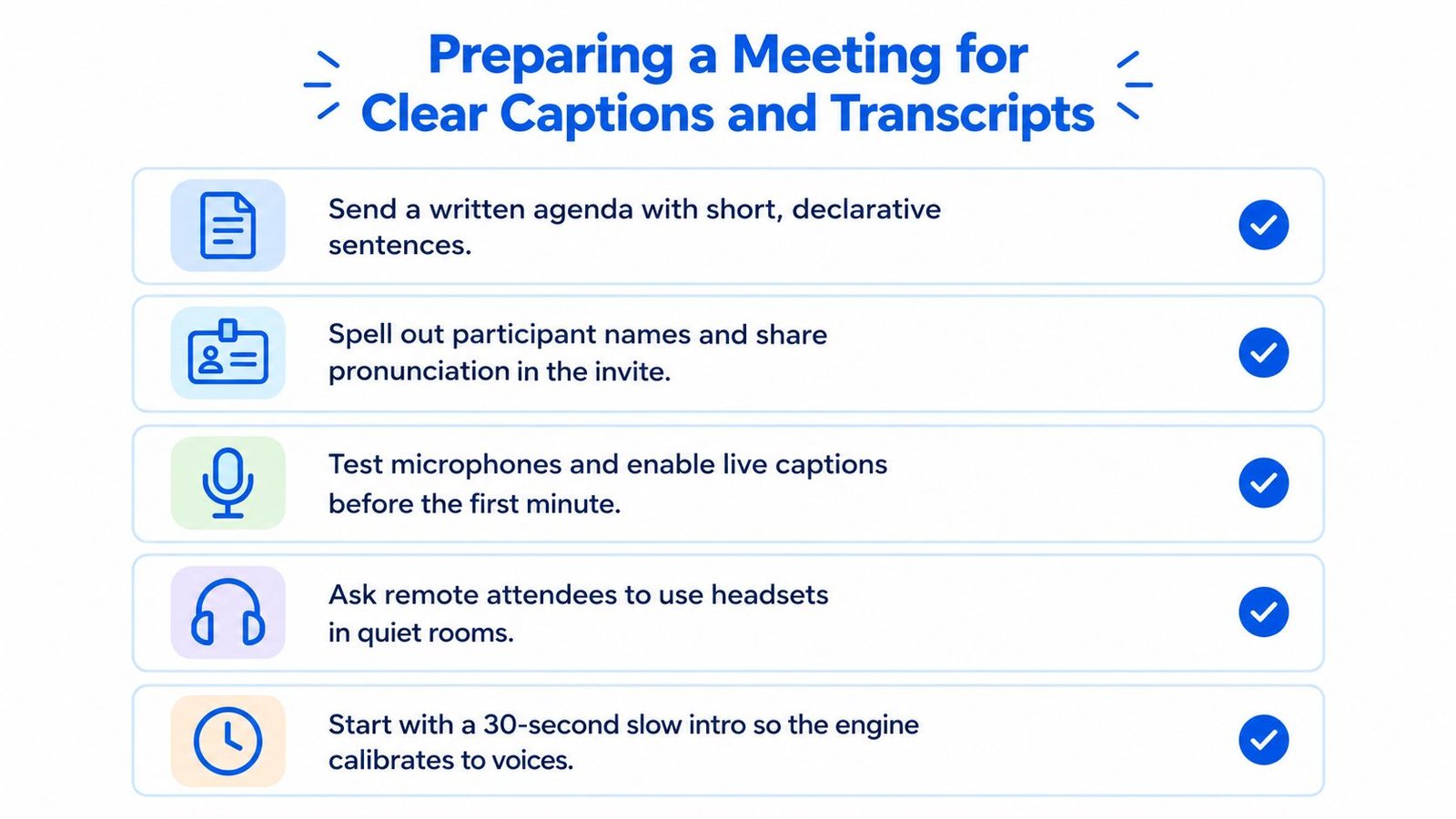
Share slides, scripts, and pre-reads at least fifteen minutes early. That gives participants and captioners time to recognize names, figures, technical terms, and document references. If background noise is the issue, use this guide to removing background noise from audio before the meeting rather than hoping the transcript can be repaired later.
State the turn-taking rules in the invitation:
- One speaker at a time. Overlap damages comprehension and transcription.
- Use the raise-hand or chat queue. The facilitator decides who speaks next.
- Avoid side conversations. Move unresolved tangents into a parking-lot list.
- Begin with a slow introduction. Each speaker states their name and role clearly.
For teams that need a recorded workflow, this automatic Zoom transcription guide can help organizers think through capture and export settings. The principle is more important than the platform: captions are a meeting input, not a rescue operation.
Running the Meeting So Nothing Gets Lost
The facilitator's job isn't to keep the conversation pleasant at any cost. It's to keep the conversation audible, ordered, and decision-focused.
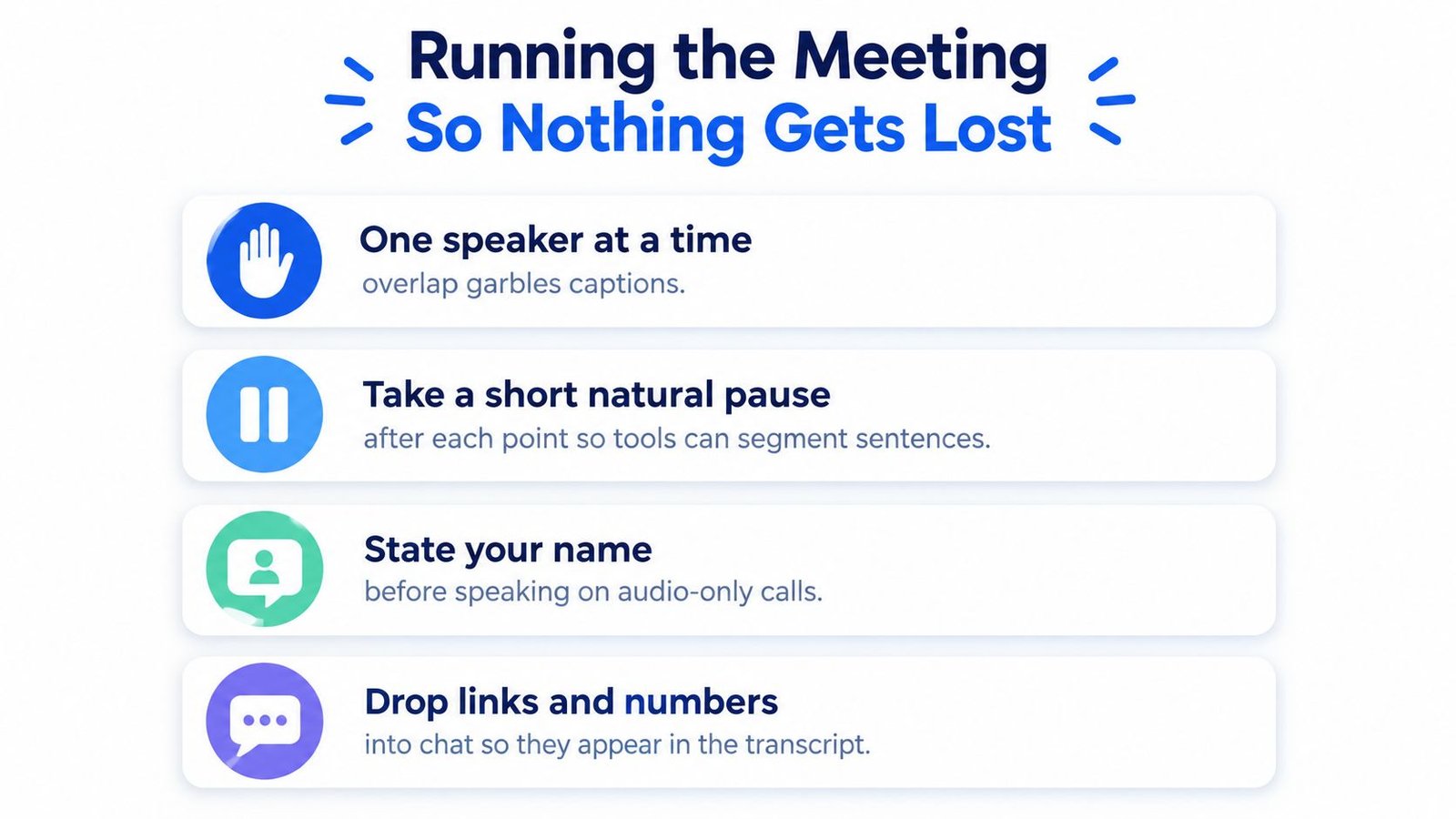
Open by stating the purpose, the desired result, and the participation rules. Ask speakers to identify themselves on audio-only calls. During discussion, allow a short natural pause after each point. That pause gives people time to process, lets captions segment sentences, and prevents the next speaker from starting before the previous thought is visible.
Control overlap
When two people speak together, captions can merge statements or assign words to the wrong speaker. The facilitator should interrupt politely: “Let's pause. Alex will finish, then Priya will respond.” Ask everyone who isn't speaking to mute, and use the chat as a queue rather than allowing several people to call out at once.
Screen sharing needs the same discipline. Distribute materials before the meeting, keep slide text readable, and don't narrate over a rapid transition. If a slide contains a number, name, or decision, say it aloud and place the relevant link or figure in chat so it enters the written record.
Make decisions transcript-friendly
Don't say, “So we're probably aligned.” Say: “We approve the revised intake process. Jordan owns the draft. Jordan will send it by Friday.” Use names and deadlines aloud, even if the scribe is also entering them in a shared document.
At the end of each agenda item, ask three questions:
- What did we decide?
- Who owns the next action?
- When is it due?
A useful objective summary framework can help separate decisions from opinions and background. The meeting should end with a readable list of commitments, not merely a recording that someone may revisit.
Roles and Workflow for Capturing Action Items
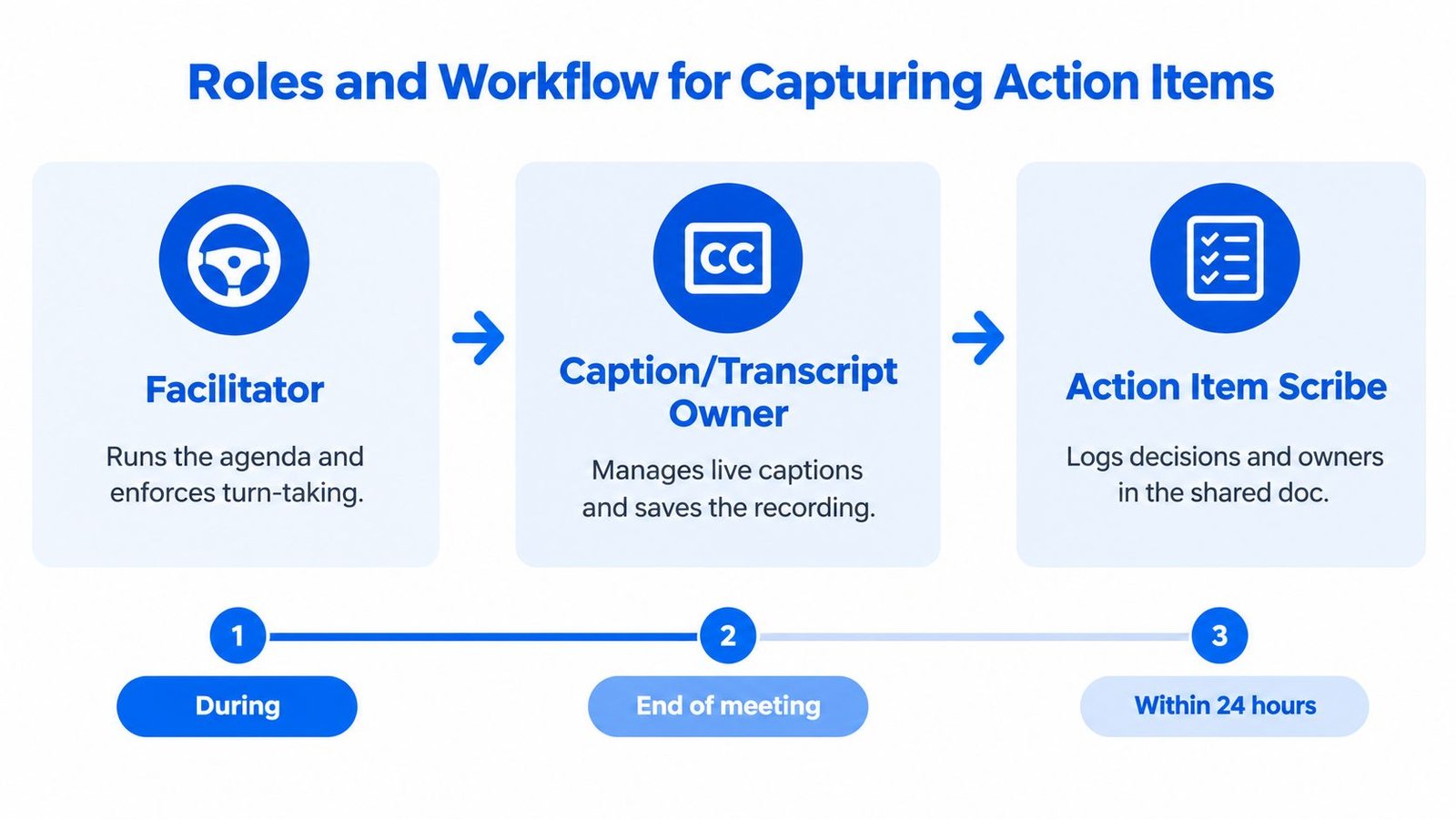
A meeting record fails when everyone owns it. Assign distinct responsibilities so facilitation, captioning, and follow-up don't compete for one person's attention.
Give each role a clear boundary
The Facilitator runs the agenda, enforces turn-taking, names the decision point, and stops discussion when the stated purpose has been met.
The Caption/Transcript Owner manages the live captioning tool, checks speaker labels, saves the recording or transcript, and exports the raw transcript within one hour.
The Action-Item Owner logs decisions and owners in a shared document during the meeting. This person sends the approved recap, with deadlines, within 24 hours.
The Action-Item Owner doesn't need to type every sentence. Their job is to capture the operational output, including decisions, unresolved questions, assigned owners, due dates, and dependencies. Teams that want a ready-made structure can adapt these free Excel action plan templates to their existing workflow.
Use a short handoff chain
- During the meeting: The Caption/Transcript Owner monitors live text and saves the raw record.
- At the close: The Action-Item Owner confirms decisions and owners against the shared document.
- Afterward: The Action-Item Owner drafts the summary from the transcript and action log.
- Approval: The Facilitator checks accuracy, removes ambiguity, and confirms deadlines.
- Distribution: The recap goes to attendees and relevant owners within 24 hours.
This workflow keeps the transcript as evidence and the action log as the working document. The meeting minutes with action items guide can support teams that need a repeatable format.
Assign a backup for every role. A process that works only when one facilitator or scribe is present isn't a process, it's a dependency. Put the backup names in the meeting template so coverage survives vacation, illness, and competing priorities.
What These Guidelines Look Like in Real Settings
The same meeting rules should change shape without losing their core. Purpose, agenda, roles, captions, and follow-up remain constant, but the level of formality depends on the setting.
A short engineering standup
The purpose is to surface blockers and assign immediate next actions. The team shares a brief agenda document, names one note-taker, and keeps the conversation tightly paced. Captions may not be needed for every participant, but the note-taker still exports a transcript to the project channel so absent teammates can verify decisions.
A telehealth visit with a deaf patient
The provider enables captions on both ends and turns on speaker labels. Before discussing treatment, the provider confirms that the patient can read the captions and see the speaker. Dosages and follow-up dates are repeated aloud, clearly and without rushing, so the transcript contains an accurate reference. The summary is emailed within 24 hours, using an accessible format.
Real-time captions are relevant beyond corporate meetings. The Minnesota Department of Human Services guidance on CART captions identifies uses including job interviews, meetings, trainings, seminars, conference calls, medical offices, and hospitals.
A weekly Bible study
The purpose may be discussion and shared reflection, but the group still needs an agenda. One facilitator watches pacing and chat, one member captures questions and action items in a shared note, and recordings are transcribed and reviewed before the next session. For groups building repeatable practices across different settings, AI workshops can help participants develop a consistent workflow without stripping away the character of the gathering.
The lesson is simple: accessibility isn't a special setup reserved for one type of meeting. It becomes ordinary when the group builds captions, visible materials, clear speech, and written follow-up into its normal operating rhythm.
Protecting Deep Work Between Meetings
“Have fewer meetings” is incomplete advice. A calendar with fewer calls can still destroy concentration if those calls split the day into unusable fragments.
Microsoft's 2025 Work Trend Index reports that Microsoft 365 users are interrupted every 2 minutes during core work hours, or 275 times a day, by meetings, email, or chat, as described in Microsoft's analysis of the infinite workday. That finding changes the management question. Don't ask only how many meetings exist. Ask how often people must stop, switch context, and restart.
Change the calendar rules
Use these settings as defaults:
- Create no-meeting blocks of 90 minutes or more. Put them on shared calendars and treat them as real commitments.
- Cap decision meetings at seven attendees. Invite people who decide, contribute essential expertise, or own the result.
- Use 25- and 50-minute defaults. The buffer absorbs overruns and gives captioners and note owners time to save the record.
- Batch meetings where possible. Concentrated collaboration protects longer stretches for writing, analysis, and production.
- Use escalation rules. If a request can wait for the next collaboration block, it doesn't interrupt protected work.
Meeting-free afternoons are particularly useful for Caption/Transcript Owners and Action-Item Owners. They need uninterrupted time to clean a transcript, verify names, resolve unclear passages, and prepare the recap. If the calendar leaves no recovery space, the record becomes late or unreliable.
Audit recurring meetings each quarter. Ask: “What decision or deliverable did this meeting produce recently, and who still needs to attend?” If the answer is unclear, replace the meeting with an async update or remove it.
A Simple Meeting Checklist You Can Use Today
Copy this checklist into the invite, meeting template, or team workspace. Use it on your very next meeting, but enforce only the two or three items that matter most for that meeting's risk. A checklist fails when everyone treats every line as aspirational.
Before the meeting
- Purpose: Write the decision, outcome, or deliverable in one sentence.
- Agenda: List three to five items with time boxes and owners.
- Attendees: Invite only people with a clear role.
- Materials: Share slides, scripts, pre-reads, and links at least fifteen minutes early.
- Vocabulary: Spell names correctly and expand acronyms.
Setup
- Microphones: Test the room and remote audio before participants arrive.
- Captions: Turn on live captions before the first agenda item.
- Speaker labels: Enable labels where the platform supports them.
- Record owner: Name the Caption/Transcript Owner and Action-Item Owner.
- Accessibility: Confirm that participants can see the speaker, shared content, and live text.
During the meeting
- Turn-taking: Allow one speaker at a time.
- Speaker identity: State your name before speaking on audio-only calls.
- Pacing: Pause naturally after each point.
- Decision language: Say the decision, owner, and deadline aloud.
- Tangents: Put unrelated issues in a parking-lot list.
- Close: Read back every action item before ending.
For teams assessing dedicated tools, AI audio transcription apps can help compare workflows without losing sight of the process. The tool matters less than assigning a human owner who checks the output.
After the meeting
- Transcript: Save it in the agreed team location.
- Summary: Separate decisions, actions, open questions, and context.
- Approval: Have the facilitator verify ambiguous wording.
- Recap: Send the summary within 24 hours.
- Ownership: Confirm each assignee and deadline.
- Audit: Remove or redesign recurring meetings that no longer produce a needed outcome.
iScribe Live Transcribe provides real-time speech-to-text on iPhone and iPad, with saved transcripts and AI-generated summaries for meetings, lectures, conversations, and appointments. Try iScribe Live Transcribe as part of your next meeting workflow, and pair live captions with a named facilitator, action-item owner, and timely recap.