
Good meeting minutes with action items follow one rule: every task gets a named owner, a firm deadline, and a way to verify it later. Everything else is context.
The rest of this guide is how to run that rule cleanly, including a two-pass workflow for hybrid and multilingual teams and a template you can copy today.
You’ve just left a meeting where everyone nodded, a few people promised to “take care of it,” and the calendar invite is already buried under the next call. That’s the normal failure point for meeting minutes with action items.
The discussion happened, but the work never got attached to a clear owner, a real deadline, or a note people can use later.
In busy hybrid teams, that gap gets wider fast. In-room speakers move on, remote attendees miss side comments, and multilingual conversations lose nuance unless someone captures the task, the owner, and the due date in plain language. Good minutes don’t just preserve what was said; they turn talk into a trackable record of who does what next.
Table of Contents
- Why Most Meeting Minutes Fail to Drive Action
- The Essential Structure of Effective Meeting Minutes
- Writing Action Items That People Actually Follow
- Using Transcripts and AI Summaries to Capture Action Items
- Making Meeting Minutes Accessible in Hybrid and Multilingual Settings
- Your Post-Meeting Workflow for Distribution and Follow-Up
Why Most Meeting Minutes Fail to Drive Action
A team can spend an hour agreeing on the next steps and still end up with nothing happening. The usual reason isn’t lack of intent. It’s that the minutes read like a loose transcript instead of an accountability record.
The weak version sounds familiar. “Discussed pricing.” “Talked about onboarding.” “Need to follow up.” Those phrases preserve the conversation, but they don’t tell anyone what to do, who owns it, or when it’s due. If the meeting should have been async in the first place, it’s worth checking a practical guide like when to avoid async meetings so the wrong kind of meeting doesn’t create bad notes on top of bad time use.
Practical rule: if a note can’t survive outside the room, it’s not an action item yet.
What breaks first
Vague language is the biggest problem. “Look into it” gives no clear finish line. “Send the client the revised draft by Friday, owner Priya” tells the reader exactly what success looks like.
Missing owners cause the second failure. A department, team, or group can support a task, but the minutes need one named person who can be held accountable. Once ownership is shared too broadly, follow-up gets fuzzy and people assume someone else handled it.
Deadlines fail in the same way. “Soon” and “next week” are comfort words, not commitments. A firm date gives the action item real weight and makes it easier to review later.
Bad minutes versus useful minutes
A bad action item is easy to write and hard to use. A useful one is short, specific, and testable.
- Weak: “Review onboarding.”
- Strong: “Draft the onboarding checklist, owner Maya, due May 15.”
- Weak: “Talk to finance.”
- Strong: “Email finance the budget questions and confirm answers by Thursday, owner Jordan.”
That difference matters because the minute reader shouldn’t need to reconstruct the meeting from memory. The minutes should already tell them what moved forward, what stalled, and what still needs attention.
The Essential Structure of Effective Meeting Minutes
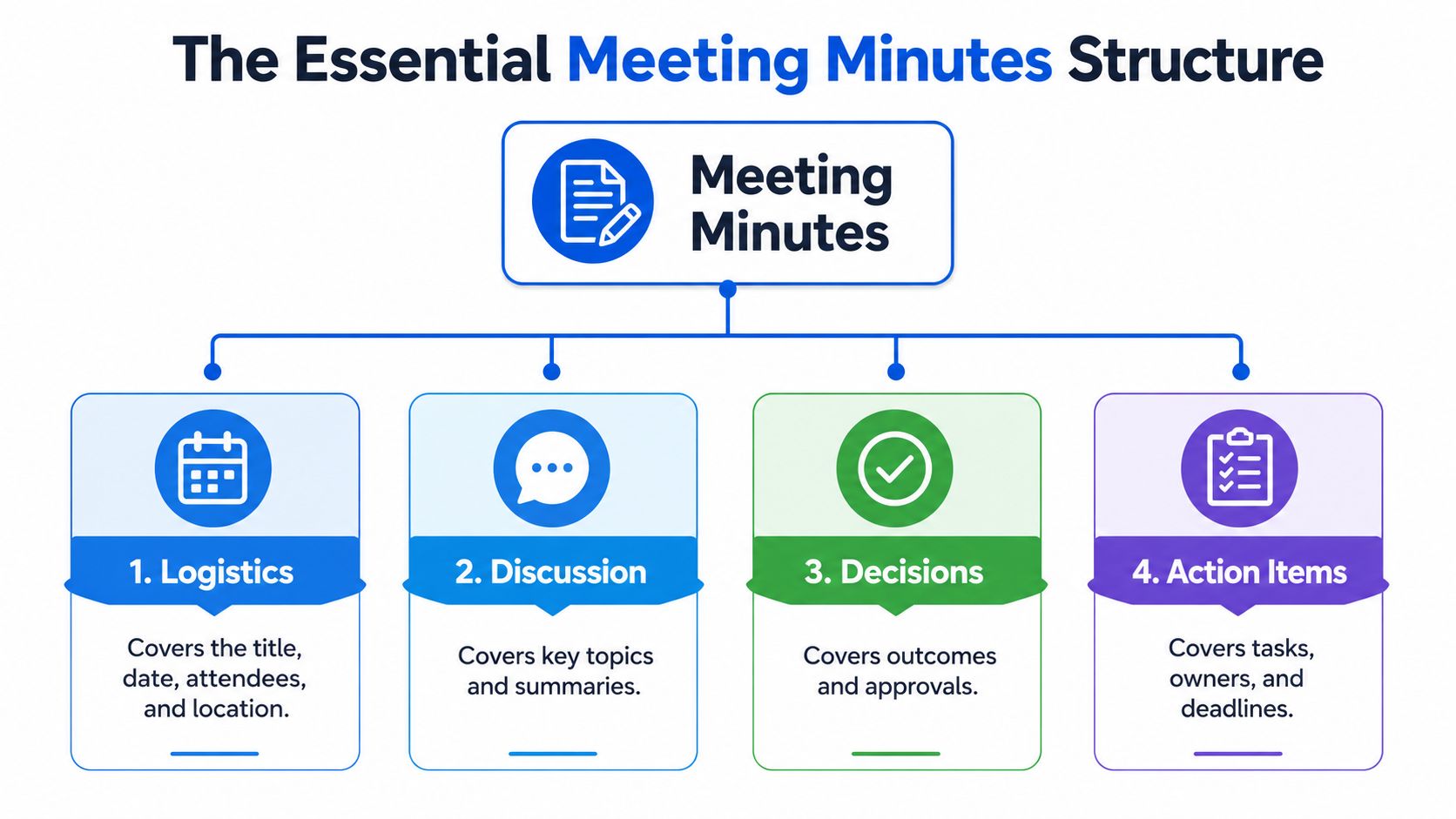
The strongest minutes start with the basic recordkeeping fields, then keep action items in a separate space. That separation matters. Discussion belongs with discussion, decisions belong with decisions, and tasks belong where people can find them fast.
Start with the logistics
The logistics block gives the meeting a fixed identity. Include the meeting title, date and time, attendees, objective, and, when it matters, the location or platform. In a board meeting, that might look like “Q2 Operations Review, May 6, 10:00 a.m., Zoom, attendees listed by name, objective, decide on staffing priorities.”
That simple block keeps people from asking what meeting the notes belong to a week later. It also helps when records are searched, audited, or compared across recurring meetings. One board-meeting template also points to exact start and end times, participants, and formal motions or resolutions, which shows how minutes can become an auditable record rather than casual notes Wrike’s action items and meeting notes template guide.
Keep discussion and decisions separate
Discussion notes should capture the main topics and the key outcomes, not every spoken sentence. If the team debated launch timing, write the summary of the debate and the final decision, not the full back-and-forth. That makes the document easier to scan and reduces follow-up questions.
Decisions deserve their own line. A clear decision might say, “Approved the July launch date,” or “Selected Vendor B for the pilot.” That line matters because it becomes the anchor for the action items that follow.
Put action items in their own section
A dedicated action-item section keeps tasks from disappearing into paragraphs. Each item should include the task, the owner, and the due date, with optional context if needed. That structure is recommended because it reduces ambiguity and helps teams review progress later Scribbl’s meeting minutes format with action items.
A practical template can look like this:
| Section | What to capture | Example |
|---|---|---|
| Logistics | Title, date, attendees, objective | “Client review, July 8, attendees:…” |
| Discussion | Main topics and summaries | “Reviewed pricing concerns” |
| Decisions | Final outcomes and approvals | “Approved revised pricing model” |
| Action items | Task, owner, deadline | “Send updated rate card, owner Ana, due Friday” |
That split makes the minutes readable and reliable. It also helps in board meetings, team standups, and client calls, because the reader can move straight to the part that matters most.
Writing Action Items That People Actually Follow
A good action item answers three questions immediately, what needs to happen, who owns it, and when it's due. If one of those is missing, the note is still a discussion point, not a commitment. The cleanest minutes treat action items as a compact accountability record, not a place for extra commentary.
The three-field rule
The simplest reliable format is short enough to fit in one line. Write the task in plain language, assign it to one named person, and use a firm date instead of a fuzzy time frame. That's the difference between “follow up on marketing” and “Send the revised campaign brief to design by Thursday, owner: Sam.”
A named person matters because departments don't get out of bed and do the work. People do. When an action item is assigned to “marketing” or “ops,” responsibility gets spread so thin that no one feels the pressure to finish.
Make the task easy to verify
Action items work better when they can be checked later. A SMART-style note stays specific and time-bound, and it tells the next reader what done looks like. That's especially useful when several people speak quickly or when the meeting moved across languages and some details were easy to miss.
Confirm the owner aloud before the meeting ends. If the person hesitates, the task is probably still too vague.
| Weak Action Item | Strong Action Item |
|---|---|
| “Look into the issue.” | “Review the error log and send findings to the team by Friday, owner: Lila.” |
| “Follow up with the client.” | “Email the client the revised scope and confirm approval by Tuesday, owner: Ben.” |
| “Update the deck.” | “Revise slide 7 with the new launch timeline by noon tomorrow, owner: Priya.” |
| “Someone should handle onboarding.” | “Draft the onboarding checklist and share it in the team folder by May 15, owner: Maya.” |
Handle hybrid and multilingual conversations carefully
In hybrid meetings, the fastest speaker often isn't the clearest one. In multilingual settings, a task can sound settled even when the wording still needs checking. The safe habit is to repeat the action item in simple English, confirm the owner by name, and capture the deadline as a date.
That last confirmation matters in noisy rooms and when people are joining through a screen. It prevents the common problem where the in-room group thinks the remote person owns the task, while the remote person heard something different.
Using Transcripts and AI Summaries to Capture Action Items
Manual note-taking still has a place, but transcript-first workflows make it easier to catch the exact wording of a decision or task. The main advantage is that the transcript gives you raw material to verify later. The main risk is that raw text can be messy, so it still needs a human pass before anyone relies on it.
Why a two-pass process works
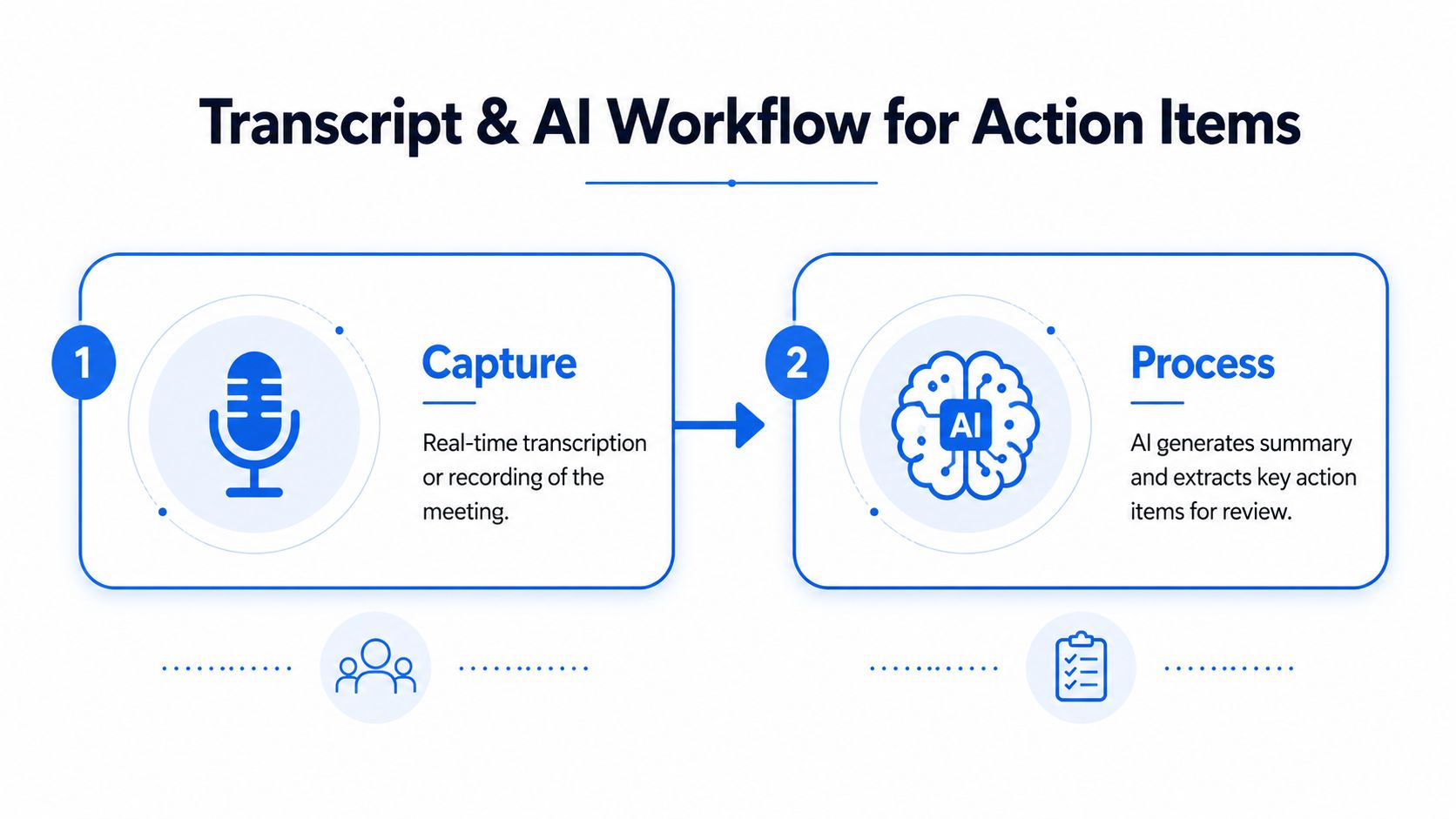
The first pass is capture. Let the transcript or recording hold the conversation as it happened. The second pass is review. Check the notes soon after the meeting, tighten the language, and turn rough candidates into final action items with a named owner and a firm deadline.
That review step matters because transcripts can miss context, especially in noisy rooms, fast back-and-forth discussions, or multilingual meetings. Human judgment is still the part that decides whether a line is a decision, a suggestion, or a real task.
Manual notes versus transcript-first workflow
| Approach | Where it helps | Where it struggles |
|---|---|---|
| Manual notes | Good for live clarification and quick ownership checks | Easy to miss details when people talk over each other |
| Transcript-first | Better for preserving exact wording and later review | Needs cleanup, especially when speakers are unclear |
| Hybrid approach | Best for confirming owners and refining the final record | Takes discipline to review promptly |
That hybrid approach is usually the most practical. One person listens for decisions, another watches for action items, and the transcript catches what slips by in the room.
Turning raw text into usable action items
A transcript line like “I can send the updated proposal next Tuesday” is not finished enough to live in the minutes yet. It needs the owner named clearly, the task stated in plain language, and the date written out. A polished version becomes, “Send the updated proposal by Tuesday, owner: Dana.”
For teams that want a structured transcript-to-summary workflow, this AI summarizer resource is a useful reference point for thinking about how summaries and action items can be separated cleanly. The important part isn’t the tool name. It’s the habit of checking the output before it gets circulated.
Keep this rule in mind: AI can draft the list, but a person should confirm the assignment.
Making Meeting Minutes Accessible in Hybrid and Multilingual Settings
Hybrid meetings expose every weakness in note-taking. People on video miss side comments, Deaf and hard of hearing attendees rely on captions, and multilingual teams can lose meaning when a phrase is translated too loosely. Minutes only help if everyone can read and use them afterward.

Accessibility changes the quality of the record
Real-time captions help people follow the conversation without depending on perfect audio. That matters in meetings, lectures, phone calls, restaurant conversations, healthcare appointments, and travel desks, where background noise or accents can hide important details. It also helps the note-taker, because a readable transcript gives them a second path to verify names, dates, and decisions.
Readable captions need more than words. Font size, spacing, and a clear layout reduce eye strain and make the meeting easier to track. When the notes later get turned into action items, those same readability choices help people review the record quickly.
Multilingual meetings need clearer ownership
Multilingual collaboration adds a different risk. The task may be understood in one language, but ownership can blur when the discussion shifts between languages or when one participant depends on a translated summary. The fix is simple in theory and hard in practice, use one clear owner name, one clear deadline, and one plain-language task statement.
That approach also fits teams that serve customers across languages. A helpful resource on how to build multilingual customer support shows why language clarity matters in day-to-day communication, not just in support queues. The same logic applies to minutes, because unclear notes create the same kind of friction.
For people who rely on accessibility-first transcription, speech-to-text for Deaf users is a useful framing of why live text is more than a convenience feature. It’s a participation tool.
Keep consent and distribution in mind
If a meeting is recorded, participants should know that up front. The final minutes should also avoid hiding the action items inside a large block of text. Put the tasks in a visible list, keep the wording short, and make the ownership line easy to find.
Accessible minutes help everyone, not only the people who need captions. They reduce miscommunication, support later review, and give remote and in-room participants the same reference point after the meeting ends.
Your Post-Meeting Workflow for Distribution and Follow-Up
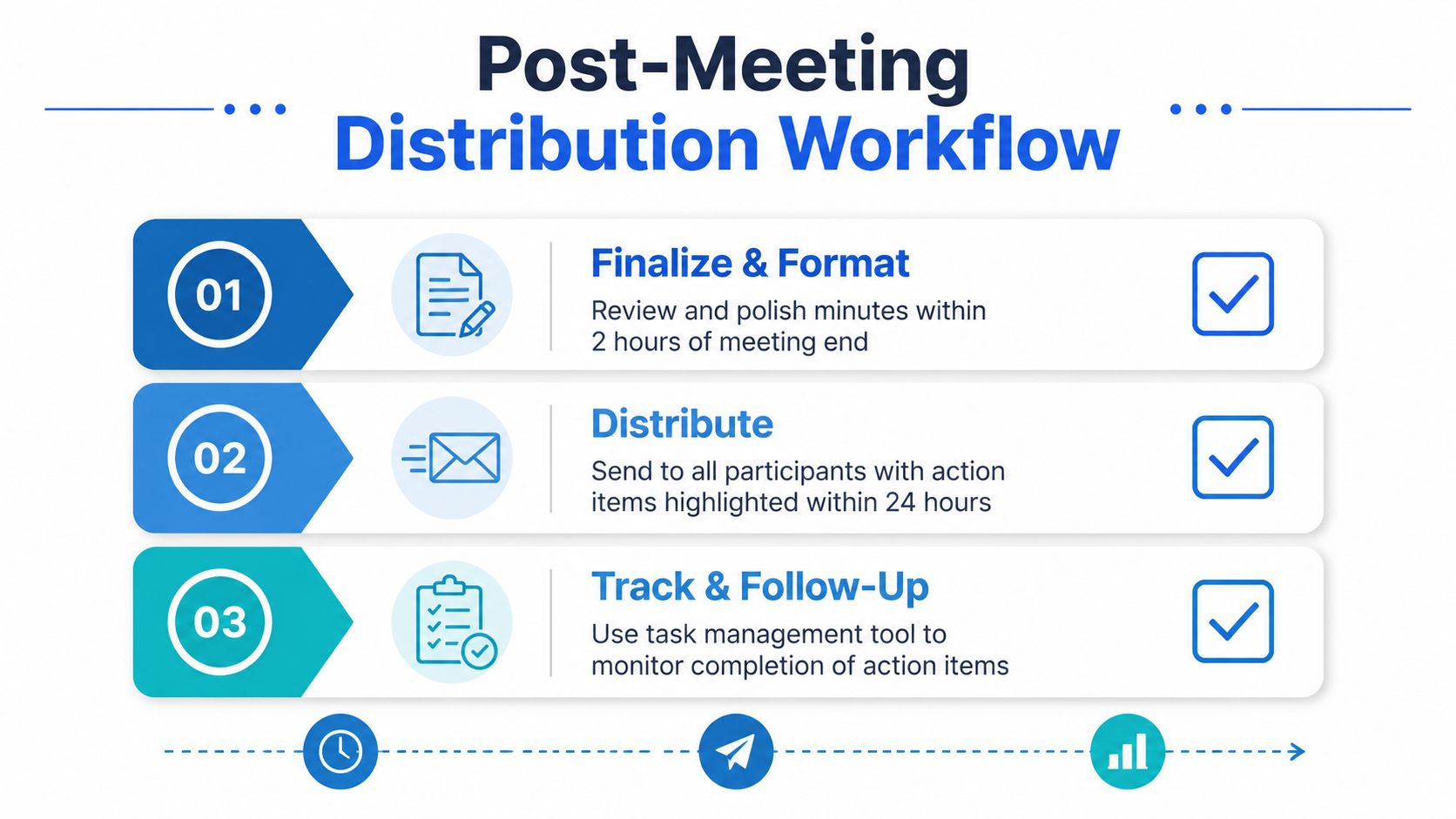
A meeting ends when the minutes land in people’s hands, not when the video call closes. The strongest habit is to finalize the notes quickly, send them while the conversation is still fresh, and track the open items at the start of the next meeting. That rhythm keeps action items from drifting.
Send the recap while the meeting is still warm
One practical guide recommends sending the final minutes within 24 hours to keep momentum and reduce confusion Shmeetings on meeting minutes action items. That timing gives people enough space to review the record without letting the details go stale.
The follow-up note should be short. Include the key decisions, the action-item list, and any links people need for context. A long recap gets skimmed, while a clear one gets used.
Track open items in the next meeting
Start recurring meetings by reviewing the prior list and marking each item as done, in progress, or blocked. That simple check keeps people honest without turning the meeting into a status lecture. It also helps you spot tasks that need a new deadline or a different owner.
If an item stalls, don’t bury it. Clarify what’s missing, name the blocker, and decide whether the task needs to be broken into smaller steps. If the original decision stopped working, revisit the decision instead of pretending the same action will suddenly succeed.
Keep the workflow lightweight
A good post-meeting process needs three things, a final review, a clean distribution path, and a visible follow-up list. Teams often overcomplicate the middle step and end up with a polished document nobody opens. The better habit is to keep the minutes short, circulate them fast, and treat the action-item section as the live record.
For teams that want to tighten the capture-and-send loop, ai audio transcription is a useful way to think about moving from spoken discussion to a usable written record. That’s the goal, not more notes, but better handoff.
If your team keeps losing action items after meetings, try a live transcription workflow that makes ownership easier to confirm and minutes easier to send on time. iScribe Live Transcribe can help you turn spoken discussion into on-screen text, saved transcripts, and quick summaries, so your next set of minutes is clearer before anyone starts chasing follow-up emails.
What is a meeting minutes template with action items?
A meeting minutes template with action items is a structured note format that separates discussion, decisions, and follow-up tasks into named sections. Each action item lists the task, the owner, and the deadline in one line, so the record can be scanned in seconds.
How detailed should meeting minutes be?
Detailed enough that a person who missed the meeting knows what was decided, who is doing what, and by when. That usually means logistics at the top, decisions in the middle, action items in their own section, and everything else summarized in one or two short paragraphs.
Who should take meeting minutes?
A dedicated notetaker who is not leading the discussion. If nobody can be pulled off the conversation, use live transcription with an app like iScribe to capture the raw record, so someone can turn it into clean minutes right after.
How do you write action items in meeting minutes?
Write each action item on its own line with three fields: the task in plain language, the named owner, and a specific deadline. Add a verification step so the item can be confirmed as done in the next meeting.
How do you handle action items from multilingual meetings?
Confirm the owner and deadline in the language of the person who owns the task, not just the meeting language. This prevents the assignment from getting lost when the conversation shifts between languages.