

If you want the clearest answer fast, iScribe is the accessibility-first pick because it handles real-time, in-person captions on iPhone and iPad, while Otter, Fireflies, Fathom, and Jamie are the stronger choices for remote meeting capture and team note workflows. This category is already big and getting bigger, with one market estimate putting AI meeting assistants at USD 3.14 billion in 2025 and USD 3.91 billion in 2026, which is roughly 24.6% year-over-year growth, so picking the right capture style now matters more than chasing whichever app has the slickest demo.
You might be reading this during a Zoom call, outside a classroom, in a church lobby, before a doctor's appointment, or in a noisy cafe where you're tired of missing half the conversation. That's exactly why most roundups get this wrong. They compare meeting bots and summary screens, but they ignore the harder question: what helps when there is no bot to join at all.
For most readers, the split is simple. If your world is scheduled online meetings, the standard remote-first options still make sense. If you need to follow live speech in a conference room, lecture hall, Bible study, medical visit, or face-to-face conversation, you need a live caption tool, not another bot waiting for a calendar invite.
Table of Contents
- What Granola AI Does Well and Where It Falls Short
- How to Pick the Right Granola AI Alternative
- The Five Best Granola AI Alternatives in 2026
- When Live In-Person Captions Beat a Meeting Bot
- Transcription Accuracy Across Real-World Audio
- Which Granola Alternative Should You Choose
What Granola AI Does Well and Where It Falls Short
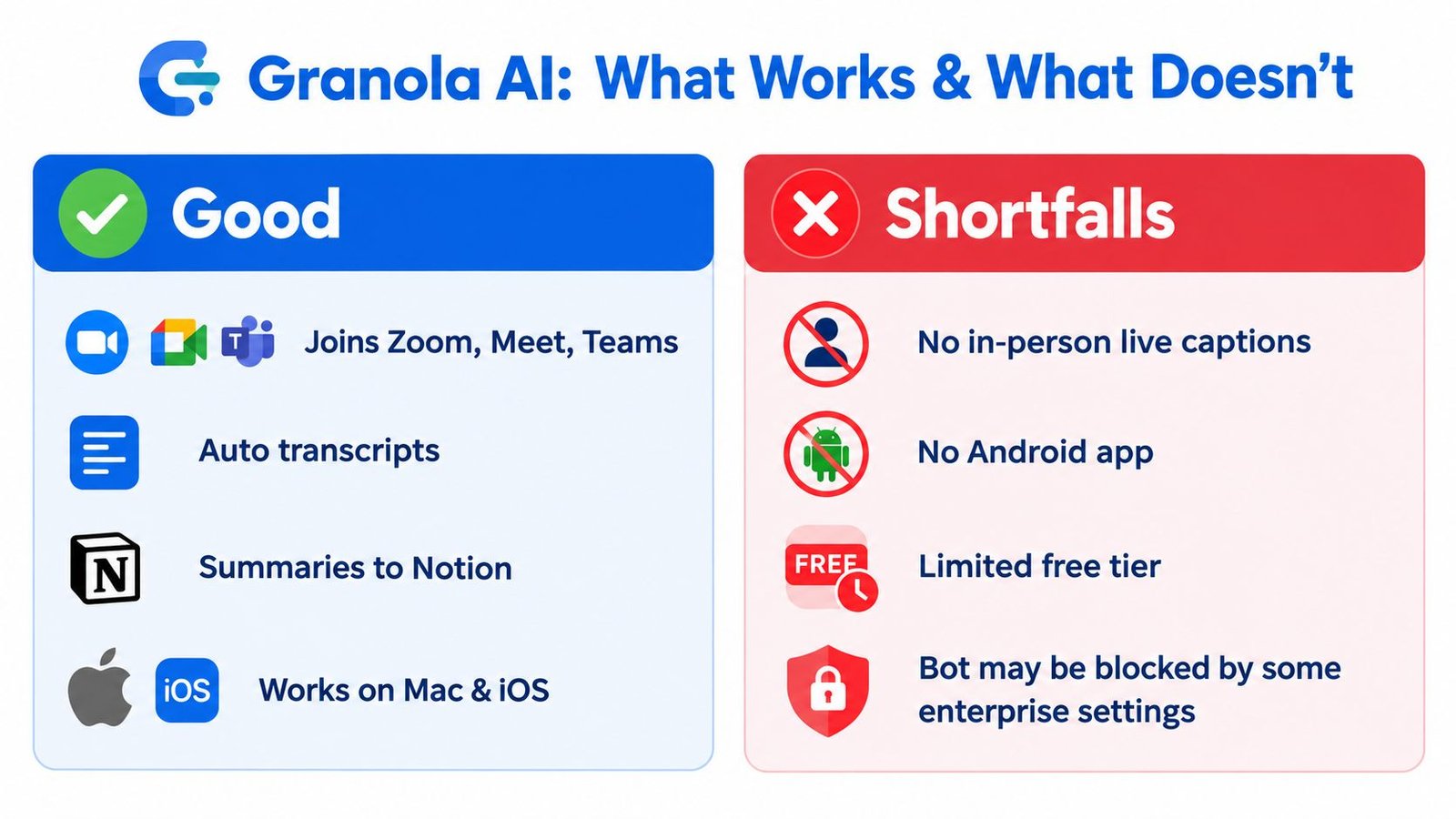
Granola works well for people who want a tidy meeting notebook without turning every call into a visible bot event. Its core appeal is obvious. You get transcripts, summaries, and action-oriented notes in a cleaner workflow than a lot of bloated meeting software.
That's useful. It's also narrow.
Where Granola still earns respect
Granola makes sense if your main job is turning meetings into polished notes. It fits people who care about:
- Clean summaries: You want a readable recap, not a raw wall of transcript text.
- Action-item extraction: You need next steps surfaced quickly after a call.
- A polished Apple-first experience: If you live on Mac and iPhone, the workflow feels more native than many generic browser tools.
That notes-first angle matters because this market isn't small anymore. The AI meeting assistant category is projected at USD 3.91 billion in 2026 by one estimate, while another pegs 2026 at USD 4.31 billion and forecasts USD 21.48 billion by 2033, which tells you buyers are treating these tools as standard workflow software, not niche add-ons (AI meeting assistants market outlook).
Where Granola stops being enough
Granola falls short the moment your workflow leaves the neat world of scheduled online calls.
- No live in-person captioning: It doesn't solve face-to-face accessibility in a room.
- No real-time on-screen captions for Deaf and Hard of Hearing users: That's a completely different use case from post-meeting notes.
- Limited platform flexibility: If you need broader device coverage, Granola starts to feel restrictive.
- Language and workflow constraints: Some readers need multilingual speech capture or file transcription, not just meeting recaps.
- A weaker fit for budget shoppers: If you want a meaningful free option, Granola isn't the obvious place to start.
Practical rule: If the person speaking is standing next to you rather than appearing in a meeting tile, a note-taking app and a live caption app are not the same thing.
That distinction matters even more because speech capture demand now rides on accessibility expectations, not just convenience. A captioning roundup citing the 2024 State of Captioning survey says 90% of organizations caption at least some content, 33.8% caption all of it, 35.6% caption most of it, and 81% caption at least some social-media content (captioning adoption data). People increasingly expect spoken content to become searchable text.
The four decision paths that actually matter
Choosing among the 5 best Granola AI alternatives in 2026 falls into one of four buckets:
Accessibility and live captioning
You need text on screen while someone is speaking in the room. Start with real-time closed captioning for live speech, not a bot-based meeting archive.Team meeting workflows
You want scheduled online meeting capture, searchable transcripts, and shared recaps.Free or low-cost use
You only need occasional transcripts and don't want to commit to a paid tool immediately.Recorded audio or video transcription
You're working from uploaded files, interviews, lectures, or saved media rather than a live call.
Granola is strongest in the middle of that list, not across all of it. That's why the right alternative depends less on features on a pricing page and more on the room you're trying to hear in.
How to Pick the Right Granola AI Alternative
You're in a clinic waiting room, a conference room, or a Zoom-heavy workday. The right tool depends on one thing first: how it captures speech. Get that wrong and every summary, transcript, and recap downstream gets worse.
Start there. Ignore brand familiarity.
Granola AI alternatives compared at a glance
| Tool Type | Live In-Person Captions | Meeting Bot | Language Coverage | Free Tier | Best For |
|---|---|---|---|---|---|
| Bot-based meeting assistant | Limited fit for in-person use | Yes | Often tuned for business meeting workflows | Often yes | Remote meetings and shared notes |
| Team archive and call assistant | Not the core use case | Yes | Broad language support focus | Often yes | Sales and team archives |
| Personal meeting recorder | Not the core use case | Sometimes no visible bot | Multilingual support varies | Often yes | Individuals and small teams |
| Local capture note app | Better for local capture than bot-heavy tools | No visible bot approach | Varies by workflow | Limited | Bot-averse professionals |
| iScribe | Yes | No | Built for multilingual live speech and saved transcripts | Yes | Face-to-face captions, classes, appointments |
A fast shortlist comes from five checks: capture method, response speed, language handling, noise tolerance, and price.
Start with the moment you need text
Live caption tools and meeting bots solve different problems. One surfaces words as they happen. The other records and organizes scheduled calls for review later.
That difference matters most for Deaf and Hard of Hearing users, but it also matters for anyone trying to follow speech in real time. If your use case is a doctor's appointment, classroom discussion, hallway conversation, worship service, or family gathering, you need readable text on screen while the person is still talking. A meeting bot does not solve that.
Apple says Live Captions on iPhone provides real-time transcription of spoken audio, can be used for live conversations around you, and supports transcribing in-person conversation through the microphone on iPhone 11 and later when the primary language is set to English (U.S.) or English (Canada) (Apple iPhone Live Captions guide). Apple also says Live Captions on iPad can transcribe spoken audio in real time and lets users customize text, size, and color for readability (Apple iPad Live Captions guide).
Check capture friction before features
The most polished summary in the world is useless if the app misses half the conversation.
For remote work, auto-join behavior can save time. For regulated teams, schools, healthcare settings, and client calls, that same behavior can create approval problems, guest-access issues, or privacy pushback. Some people need a bot in every scheduled call. Others need local capture on their own device because a bot will never be admitted.
This is why accessibility-first buyers should test setup friction as hard as transcript quality. If a tool takes too long to open, needs calendar invites to function, or depends on call-platform permissions, it will fail in face-to-face situations.
Language, noise, and budget are the deciding factors
Speech tools break down in predictable places: accents, fast turn-taking, code-switching, overlapping speakers, HVAC hum, cafeteria noise, and classroom echo. Vendor screenshots hide that. Your own audio reveals it.
Run a short test before you commit. Use a noisy room, two speakers, and the language mix you hear every week. If your recordings usually sound messy, review this guide on removing background noise from audio before transcription.
Price comes last, not first. A free plan is useful only if the capture model fits your day.
If you're replacing a wider workplace stack at the same time, Prompt Builder on switching from Teams is useful because it looks at the workflow change around meetings, not just transcript output.
And if you want an iPhone option in this category, Live Transcribe iSrcribe is listed in the App Store with the snapshot line “See what's being said.”
The Five Best Granola AI Alternatives in 2026
Most lists in this category only rank remote meeting software. That's too narrow. These five make sense because they cover the split between online bot-based workflows and face-to-face live captioning.
Otter
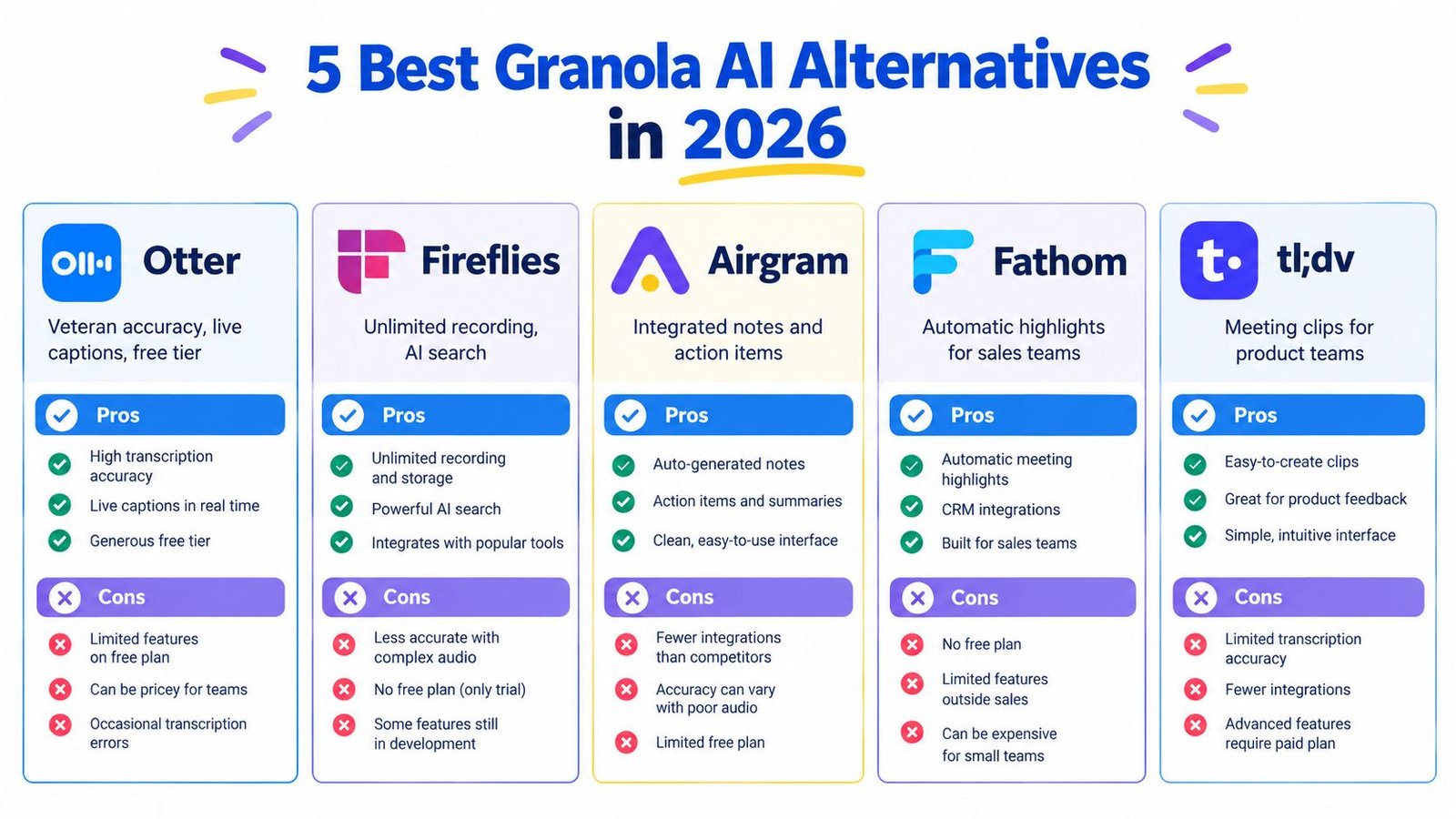
Otter is the safe default if your workday is mostly scheduled remote meetings and you want a familiar transcription workflow. It's established, widely recognized, and generally easy to roll out for people who need searchable notes more than fancy post-processing.
Its capture model centers on online meetings, and that's the right context for it. If your day is Zoom-heavy, it fits naturally. If your problem is hearing someone in a conference room or exam room, it doesn't.
Best for: Individuals and small teams who want reliable remote meeting notes with a usable free tier.
Fireflies
Fireflies is the better fit when meetings are part of a larger sales or customer-success system. It leans harder into searchable archives, collaboration, and downstream workflows.
This is a team tool first. That's good if calls need to move into a shared library and support follow-up. It's less compelling if you just want a private, quiet note workflow.
Best for: Sales, customer success, and operations teams that care about searchable meeting memory and system integration.
Fathom
Fathom is easy to recommend to people who want strong meeting recaps without overcomplicating setup. It has become a favorite for users who want recording plus summaries and don't want to feel trapped behind a paywall immediately.
It's a practical choice for solo professionals and small teams. It's weaker as an accessibility answer because the product category itself is still centered on remote calls, not real-world speech around you.
Best for: Individuals, founders, and small teams who want straightforward meeting notes and generous entry-level use.
Jamie
Jamie's appeal is simple. It avoids the visible-bot problem that annoys a lot of people. If you dislike having another participant join the call, this style of desktop capture is easier to live with.
That doesn't make it a universal winner. It still serves a meeting-note workflow, not a live follow-along accessibility workflow. But for professionals who want local capture without a bot entering the room, it's a smart alternative.
Best for: Bot-averse professionals who want a quieter capture experience on desktop.
iScribe
If your actual problem is following speech live, most competitor roundups fail you. iScribe belongs on this list because it addresses a different and often more urgent job: real-time captions for in-person communication.
That includes meetings, lectures, doctor's visits, sermons, cafes, classrooms, Bible studies, and everyday conversations where no calendar bot can ever show up. The app's App Store listing identifies the developer as Harshva Technologies Private Limited and includes a support contact plus linked help, terms, and privacy pages, which is what you want to see from a real, maintained product (iScribe App Store listing by Harshva Technologies Private Limited).
This is also the clearest answer to the question people keep asking about live transcription. Why pick it over Granola? Three reasons come first: real-time live transcription, accessibility-first use in face-to-face settings, and AI notes as a secondary feature instead of the whole point.
Best for: Deaf and Hard of Hearing users, students, caregivers, clergy, patients, and anyone who needs live on-screen text during in-person speech.
The sharpest way to choose among the five
Use a short elimination test:
- Choose Otter if your day is built around remote meetings and you want a familiar, searchable workflow.
- Choose Fireflies if team collaboration and follow-up systems matter more than a personal notes app.
- Choose Fathom if you want simple meeting capture with a low-friction start.
- Choose Jamie if visible bots are the deal-breaker.
- Choose iScribe if the speaker is physically near you and you need captions now, not just a summary later.
A lot of teams also use a hybrid setup. One tool handles scheduled calls. Another handles the world outside the calendar.
If you summarize recorded video as part of your work, it's also smart to verify video authenticity while summarizing, especially when clips move between teams without much context.
For anyone comparing capture styles more broadly, it helps to understand the wider class of real-time transcription software, because the best product depends on whether you're capturing meetings, ambient speech, uploaded files, or all three.
When Live In-Person Captions Beat a Meeting Bot
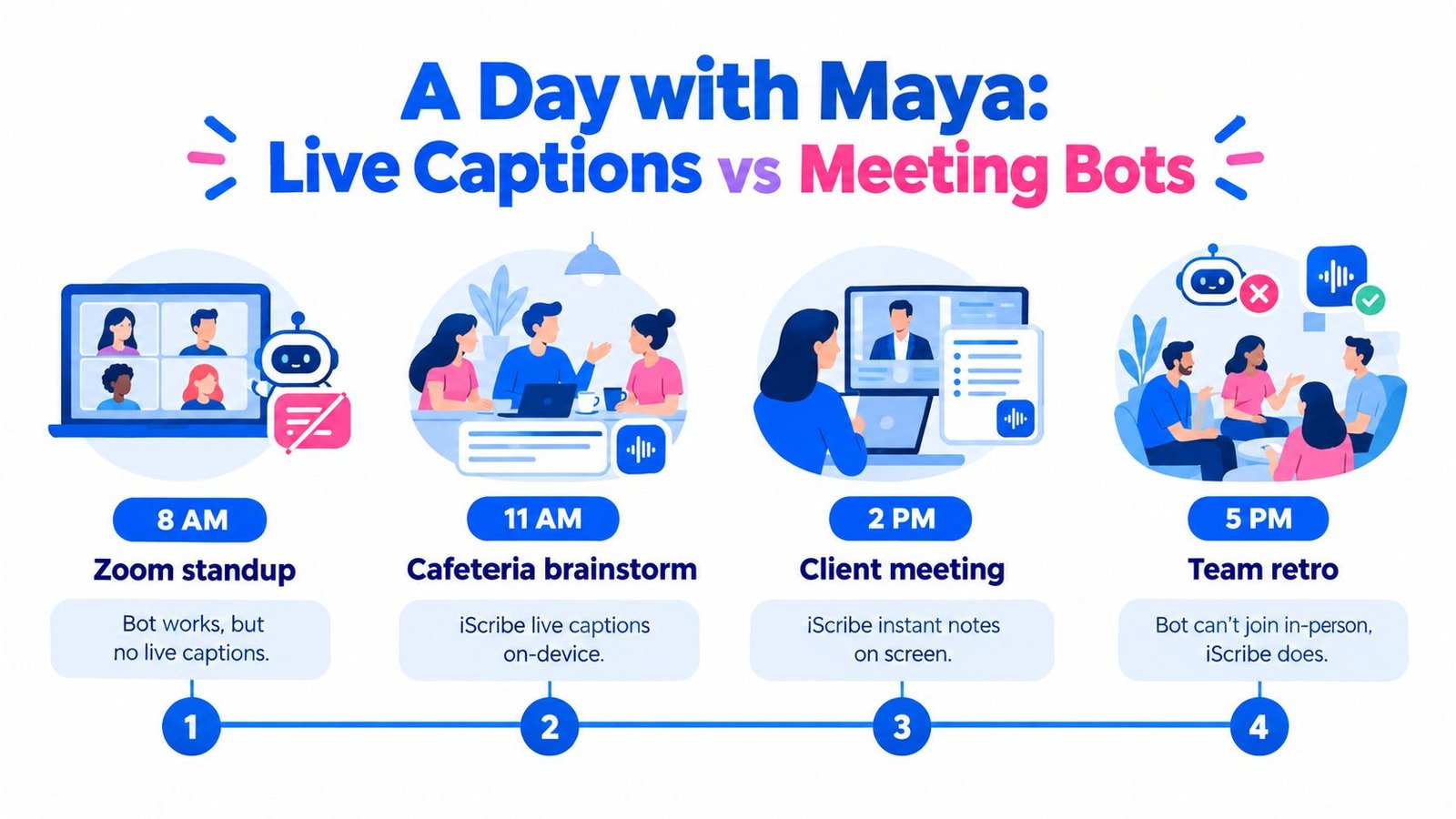
Maya's Tuesday makes the difference obvious.
At 8 a.m., she joins a remote standup. A standard meeting note tool handles it fine. The meeting is scheduled, the audio path is clean enough, and everyone's already inside the platform.
At 10 a.m., she walks into an in-person design review in a glass-walled conference room. Three people interrupt each other. Someone turns away to write on a board. Another drops a key detail while shuffling papers. A meeting bot can't join that room, so she opens her phone and follows the speech on screen instead.
The middle of the day is where bots lose
At 1 p.m., Maya sits in a neuroanatomy lecture. The professor speaks fast and faces the board half the time. What she needs isn't another meeting summary later. She needs text while the lecture is happening.
At 3:30 p.m., she has a telehealth visit with her audiologist. Privacy matters. Friction matters. She doesn't want to fuss with invites, permissions, or a visible recording participant.
By 6 p.m., she's at a birthday dinner with a Deaf friend. The phone becomes a portable caption display passed around the table. At 8 p.m., she's at church, where spoken testimony is easier to follow for an older member with hearing loss when the words show on screen.
The best accessibility tool is often the one that works when nobody had time to “set up a meeting.”
Four signs live captions beat a meeting bot
Use a live in-person captioner when these signals show up:
- No calendar invite: Hallway chats, office drop-ins, class discussions, and family conversations don't start with a meeting link.
- Multiple physical speakers: Overlapping voices in a room create a different problem than one person on a webinar mic.
- Privacy-sensitive settings: Medical, counseling, or personal conversations often need a simpler capture path.
- Deaf and Hard of Hearing access: If someone needs on-screen text to participate, post-meeting summaries are too late.
That's the gap most “best alternatives” pages miss. They compare meeting memory. They don't compare participation in the moment.
Transcription Accuracy Across Real-World Audio
Accuracy claims get slippery fast, so I trust rough field conditions more than polished demos. Independent benchmarking for 2026 shows just how wide the gap still is.
One third-party comparison reports OpenAI Whisper Large-v3 at 88 to 93% accuracy on real-world meeting audio, Deepgram Nova-3 at 94%, Otter.ai at 82 to 85%, and Fireflies.ai at 88 to 92%, with performance dropping further in noisy environments. The same source also cites another 2026 audit that found mean AI transcription accuracy of 61.92% across business audio, with the best system at 69.36%.
Transcription accuracy by audio condition
| Tool | Clean Audio WER | Real-World WER | Noisy/Multi-Speaker WER | Best Fit |
|---|---|---|---|---|
| Otter | Lower error in clean remote meetings | Moderate variation | Drops in noise | Remote meeting notes |
| Fireflies | Competitive in strong meeting audio | Solid but variable | Drops in noise and overlap | Team meeting capture |
| Fathom | Depends heavily on meeting audio quality | Moderate variation | Less reliable in rough audio | Straightforward online meetings |
| Jamie | Depends on device and recording path | Moderate variation | Can struggle with messy room audio | Desktop capture without visible bot |
| iScribe | Best judged in live speech contexts rather than webinar-style tests | Built for live follow-along | Stronger fit when speech is in person and immediate readability matters | Live captions in rooms, classes, appointments |
WER means word error rate, which is the share of words the system gets wrong through substitutions, omissions, or insertions.
What the numbers mean in practice
Don't overfocus on one transcript score. In the world, latency matters too. Latency means how fast words appear on screen after someone speaks. For live accessibility, a slightly less perfect transcript that appears quickly can be more useful than a cleaner transcript that lags.
Speaker labeling matters. Jargon handling matters. Noise resilience matters. If hearing in background noise is a constant problem for you, this guide on tools that help hearing speech in noise gives useful context for why “good enough in a demo” often falls apart in busy environments.
If you're testing apps yourself, run the same messy clip through each one, then compare the output with a basic sound-to-text workflow. That tells you more than any landing page claim.
Which Granola Alternative Should You Choose
Pick by workflow, not hype.
A four-step choice that actually works
Name the primary job
Is it live accessibility, team meeting capture, free personal notes, or file transcription? If you can't answer that, you'll buy the wrong thing.Choose the capture model
Decide whether you need an on-device listener for speech around you or a bot that joins scheduled calls.Lock in your essentials
That might be language support, readable on-screen text, export options, privacy posture, or shared team search.Match the budget last
Free tiers matter, but only after the tool proves it can capture the right kind of conversation.
Here's the blunt version. Choose iScribe if you need live in-person captions for Deaf and Hard of Hearing access, classes, church, doctor's visits, or everyday conversation. Choose Otter if you want a familiar free-tier option for remote meeting notes. Choose Fireflies if your work lives inside sales and follow-up systems. Choose Fathom if you want a low-friction meeting note tool for personal or small-team use. Choose Jamie if you want desktop capture without a visible bot. The best Granola alternative is the one that matches the room you record in, not the room from the vendor's prettiest screenshot.
If Granola feels too meeting-centric for the way you communicate, iScribe Live Transcribe gives you real-time captions for face-to-face speech, plus saved transcripts and AI notes in the same iPhone and iPad workflow. That makes it relevant when you're in a meeting, classroom, church, cafe, or doctor's office and need to follow spoken words as they happen. Visit iScribe Live Transcribe to see how it fits live captioning and note-taking together.