
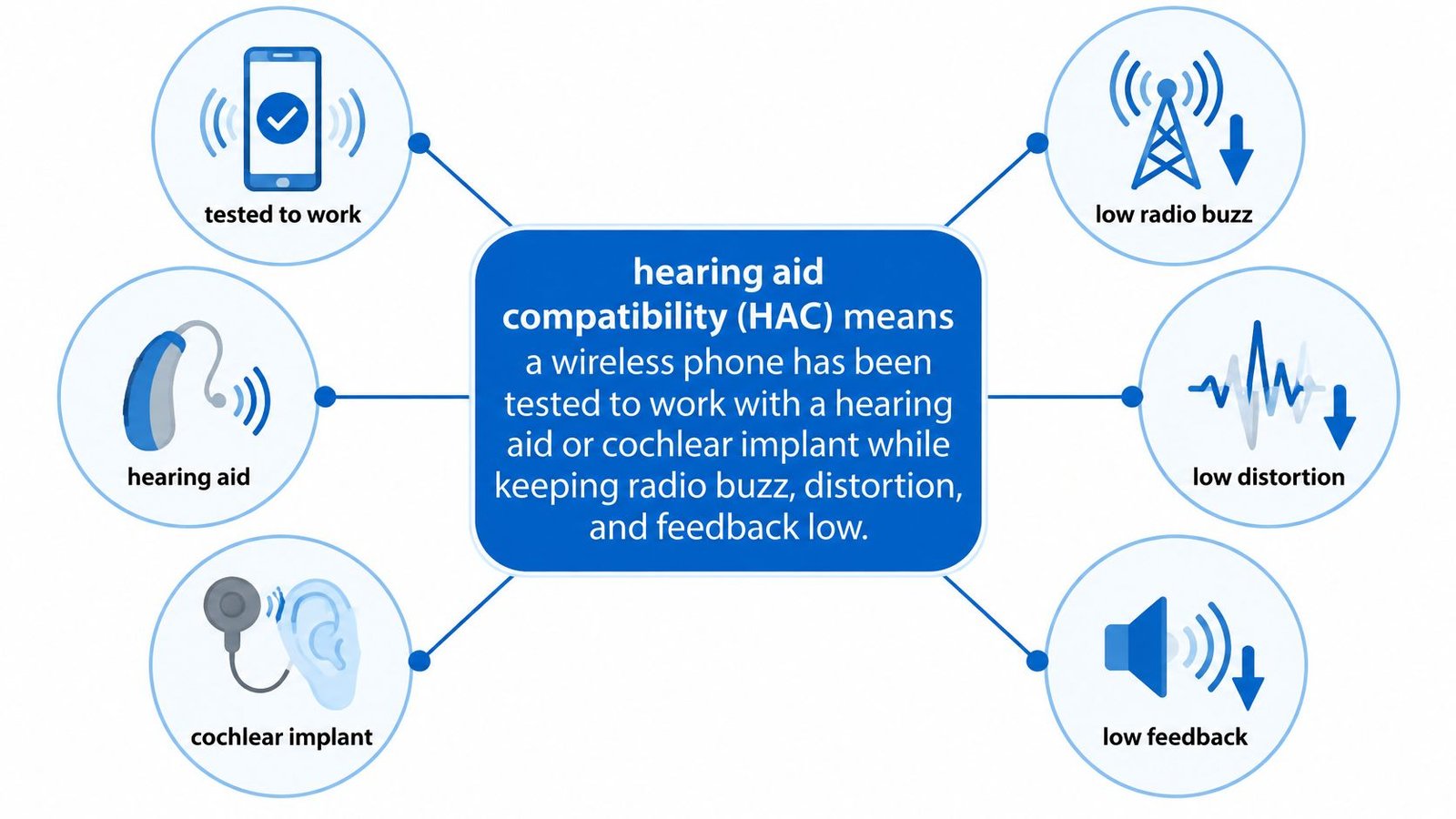
Hearing aid compatibility (HAC) measures whether a wireless phone can work with a hearing aid or cochlear implant while limiting unwanted interference. The U.S. Food and Drug Administration explains how HAC testing assesses a phone's interaction with hearing technology. A passing rating can indicate less radio buzz or distortion, but it cannot promise clear speech in every setting.
Hearing loss affects people around the world, and the World Health Organization estimates that more than 1.5 billion people live with some degree of it. A phone rating measures interference from the handset, not how well you can follow a speaker in a clinic, classroom, church, cafe, or meeting. Room noise, distance, and the way someone speaks can still make words difficult to catch.
This guide starts with the M and T ratings, then looks at the room and speech conditions those ratings cannot measure. Live captions can provide another way to follow spoken conversation when hearing aids or phone ratings leave words unclear.
Table of Contents
- What Hearing Aid Compatibility Means
- How Acoustic Coupling and Telecoils Work
- Bluetooth Smartphones and Public Audio
- How to Check a Phone Before You Buy
- When Ratings Still Leave Words Unclear
- Match the Handset and Add Captions
What Hearing Aid Compatibility Means
A HAC rating measures how well a wireless phone limits radio-frequency interference with hearing aids and cochlear implants. The U.S. Food and Drug Administration's explanation of hearing aid compatibility describes this testing in terms of reducing unwanted interference. The rating covers radio interference, not speech comprehension.
In the United States, the Federal Communications Commission (FCC) requires wireless handsets to be tested under the IEEE/ANSI C63.19 technical standard. Older labels used two letters: M for acoustic coupling through the hearing aid's microphone, and T for inductive coupling through its telecoil. Each scale runs from 1 to 4, with 4 the strongest rating.
Under the older framework, the FCC generally treated a handset as hearing aid compatible at M3 for acoustic coupling or T3 for telecoil coupling. Combined hearing aid and handset ratings of 5 indicated normal use, while 6 indicated excellent performance. The 2019 ANSI update moved many newer phones away from printed M and T labels, while testing continued to address radio-frequency interference, distortion, and feedback.
How to read an older M or T label
The FCC consumer guide to hearing aid compatibility explains that the numbers describe electromagnetic coexistence and signal transfer. M ratings run from M1 to M4, with M4 indicating the strongest resistance to interference. T ratings run from T1 to T4, with T4 indicating the strongest telecoil coupling.
A higher score points to lower expected interference under the test conditions. In use, results can still vary with the hearing aid model, phone settings, signal strength, and room.
Practical rule: Check the M and T ratings, or the newer HAC statement, while comparing phones. A quiet demonstration can help you assess a particular setup, while the rating provides a standardized measure.
| Rating | What it measures | Strength | What it meant in practice |
|---|---|---|---|
| M1 | Acoustic coupling through the aid microphone | Lowest interference resistance | Usually not treated as compatible |
| M2 | Acoustic coupling through the aid microphone | Modest resistance | Usually below the old pass line |
| M3 | Acoustic coupling through the aid microphone | Good resistance to radio interference | Historic FCC minimum for acoustic HAC |
| M4 | Acoustic coupling through the aid microphone | Strongest acoustic result | Best expected microphone-mode performance |
| T1 | Inductive coupling through the telecoil | Weak magnetic transfer | Usually not treated as compatible |
| T2 | Inductive coupling through the telecoil | Limited telecoil performance | Usually below the old pass line |
| T3 | Inductive coupling through the telecoil | Solid telecoil coupling | Historic FCC minimum for telecoil HAC |
| T4 | Inductive coupling through the telecoil | Strongest telecoil result | Best expected telecoil-mode performance |
| Combined 5 | Aid immunity rating plus handset rating | Normal everyday use | Usable for typical calls |
| Combined 6 | Aid immunity rating plus handset rating | Excellent performance | Preferred when both devices rate high |
If a phone's box does not show M3 or T4, check the manufacturer's or carrier's current HAC statement. Newer phones may use updated testing and describe compatibility without those older labels. નોંધ
How Acoustic Coupling and Telecoils Work
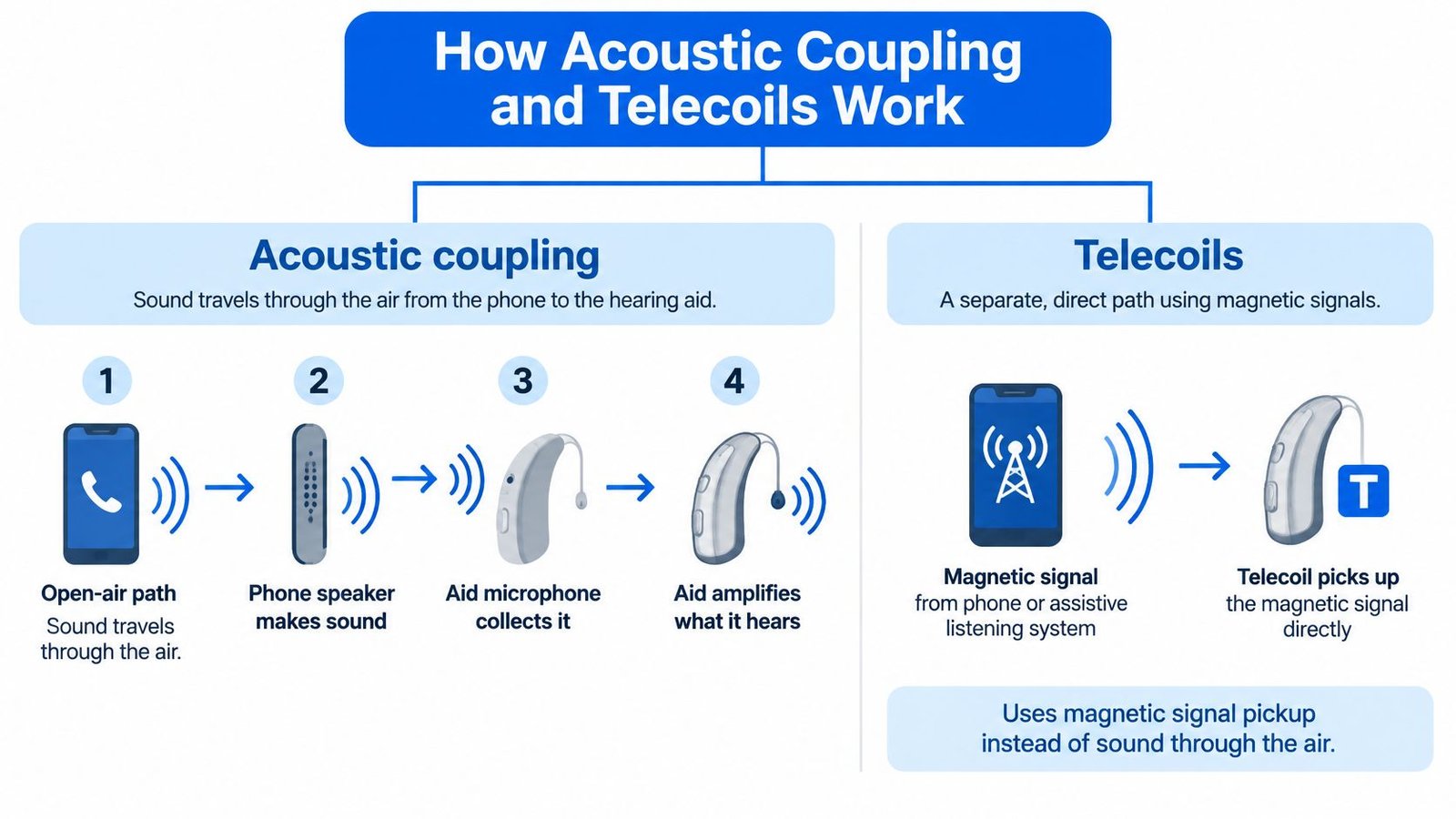
Think of two paths into the same hearing aid. One is open air. The other is a private magnetic path.
Acoustic coupling is the open-air path. The phone speaker makes sound, the aid microphone collects it, and the aid amplifies what it hears. That path is simple, and it is the one many users already use when they hold a handset to the ear. The microphone does not know which sound you wanted. In a cafe it also collects dishes, music, and the table behind you. Hold the handset tight against the aid and the speaker can leak back into the microphone, which is the squeal people call feedback.
Inductive coupling is the private path. A telecoil is a small coil of wire inside many hearing aids and some cochlear implant processors. When the phone, or a hearing loop, sends a magnetic signal, the coil turns that signal into audio. You can keep the microphone quieter, which often cuts room noise during a call or a service. You usually switch the aid to T, MT (microphone plus telecoil), or a named telecoil program. The phone's T rating only matters on that program.
Where a loop changes the room
A hearing loop uses the same magnetic idea at room scale. A wire around a seating area, a service counter, or a section of pews carries the audio as a magnetic field. Your telecoil picks it up the way it would pick up a compatible handset, without a neckloop dangling on your chest. Churches, theaters, ticket windows, and pharmacy counters are the places where that private path earns its keep, because the talker is far away and the room is not quiet. A short guide to what a hearing loop is walks through how those systems are signed and switched on.
Not every aid includes a coil. A high T result on the phone does nothing if the processor has no telecoil and no telecoil program. Ask before you shop. If the clinician says the aid is microphone only, stop treating T4 as a reason to buy that handset.
Say you are in a weekday service. On microphone mode you hear the HVAC and the people in the row behind you as loudly as the reader. You switch to T, the loop is live, and the voice comes forward while the room drops back. If the words are still muddy after that switch, the limit is often the talker, the distance, or the mix of voices, not a missing M number. The coil delivered the signal. It did not rewrite unclear speech.
Bluetooth Smartphones and Public Audio
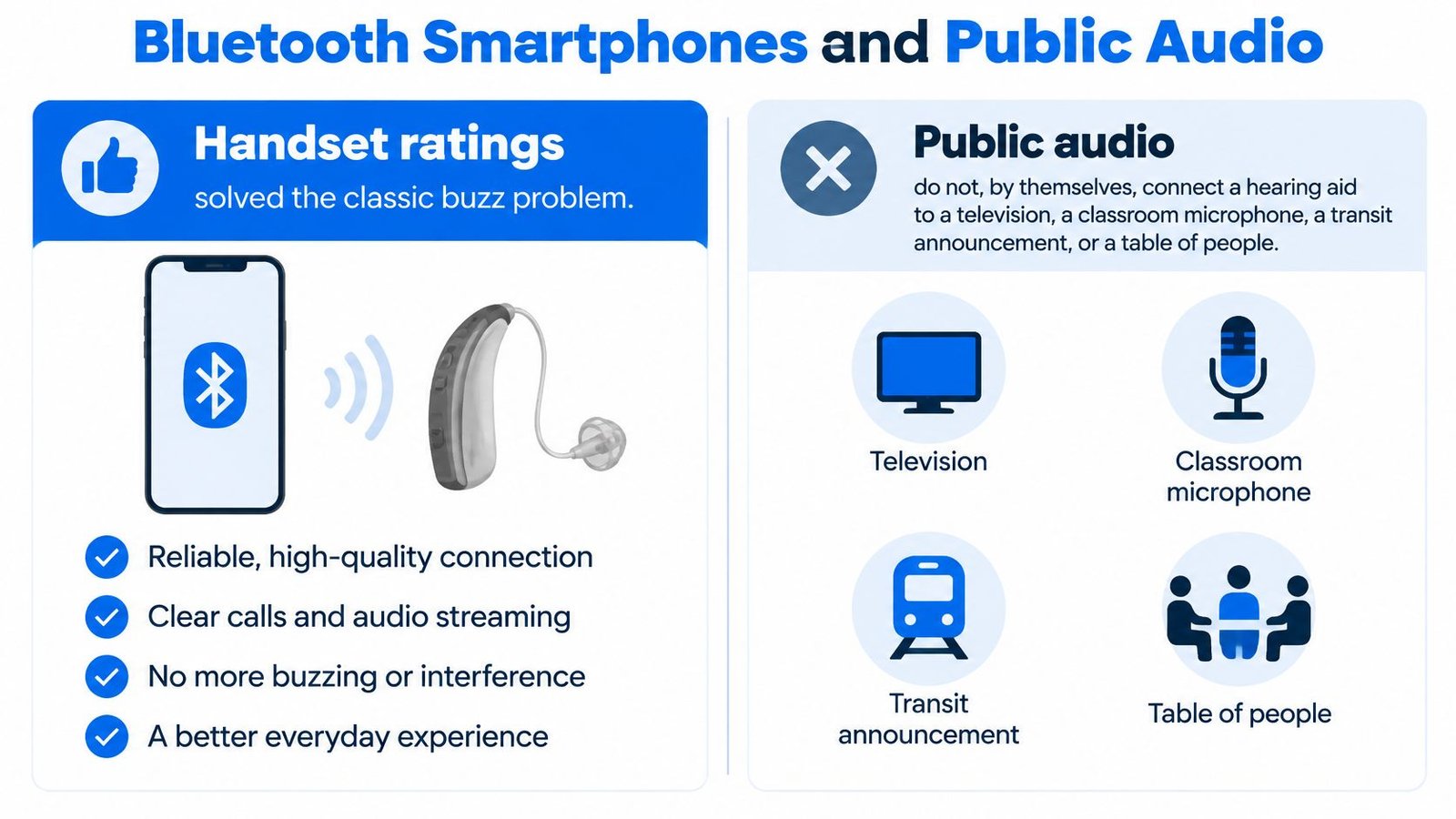
Handset ratings solved the classic buzz problem. They do not, by themselves, connect a hearing aid to a television, a classroom microphone, a transit announcement, or a table of people.
Bluetooth added a third path, and for years it was a patchwork. Made for iPhone hearing aids pair with Apple phones and send calls, music, and media into the aids. Android Streaming for Hearing Aids, often called ASHA, covers many Android phones with the same idea. One brand's accessory often fails on the other phone. If you are still choosing a platform, finding the right phone for your budget from Used Mobiles 4 U is a useful pass over iOS and Android before you test hearing features.
Bluetooth LE Audio is meant to replace that split with one standard for hearing aids. Auracast, a broadcast form of that audio, can send one venue signal to compatible aids, earbuds, headphones, or assistive receivers, so you are not stuck with a single neckloop. The Bluetooth LE Audio hearing overview is clear that Auracast needs compatible receiving hardware and a transmitter the venue has switched on. It is not present everywhere. “Compatible” increasingly means compatible with an ecosystem and a place, not merely with a handset.
What each channel actually needs
Scan the row that matches how you listen, then ask what fails when the room has neither a loop nor Auracast.
| Channel | What it connects | What you need | Main limit |
|---|---|---|---|
| Acoustic M mode | Phone speaker to the aid microphone | An M rating and a microphone program | Buzz, feedback, and room noise |
| Telecoil T mode | Magnetic signal to the telecoil | A T rating, a telecoil, and often a hearing loop | No benefit if the aid has no coil |
| Made for iPhone | Phone audio to paired Apple-compatible aids | A supported iPhone and Made for iPhone aids | Limited to compatible Apple setups |
| Android ASHA | Phone audio to paired Android-compatible aids | A supported Android phone and ASHA aids | Not every Android phone or aid qualifies |
| Bluetooth LE Audio | A more standard stream to hearing aids | LE Audio on both the phone and the aids | Missing on many older devices |
| Auracast | A public broadcast to aids, earbuds, or receivers | An enabled transmitter and a compatible receiver | Many venues do not offer it yet |
| Live captions | Recognized speech to on-screen text | A phone, caption feature or app, and often internet | Text support, not amplified sound |
Before you trust a stream in public, answer three questions. Can you still hear the person beside you while audio plays in both aids? How do you discover the broadcast, by a sign, a QR prompt, or a menu you have never opened? What is the backup if pairing fails halfway through a lecture?
Many rooms have neither Auracast nor a hearing loop. A fully rated phone does not fix an announcement that never reaches your device, or a table where three people talk at once.
That is why on-screen captions stay useful after the handset has passed every interference test. They do not replace the stream. They cover the minutes when the stream is not there.
How to Check a Phone Before You Buy
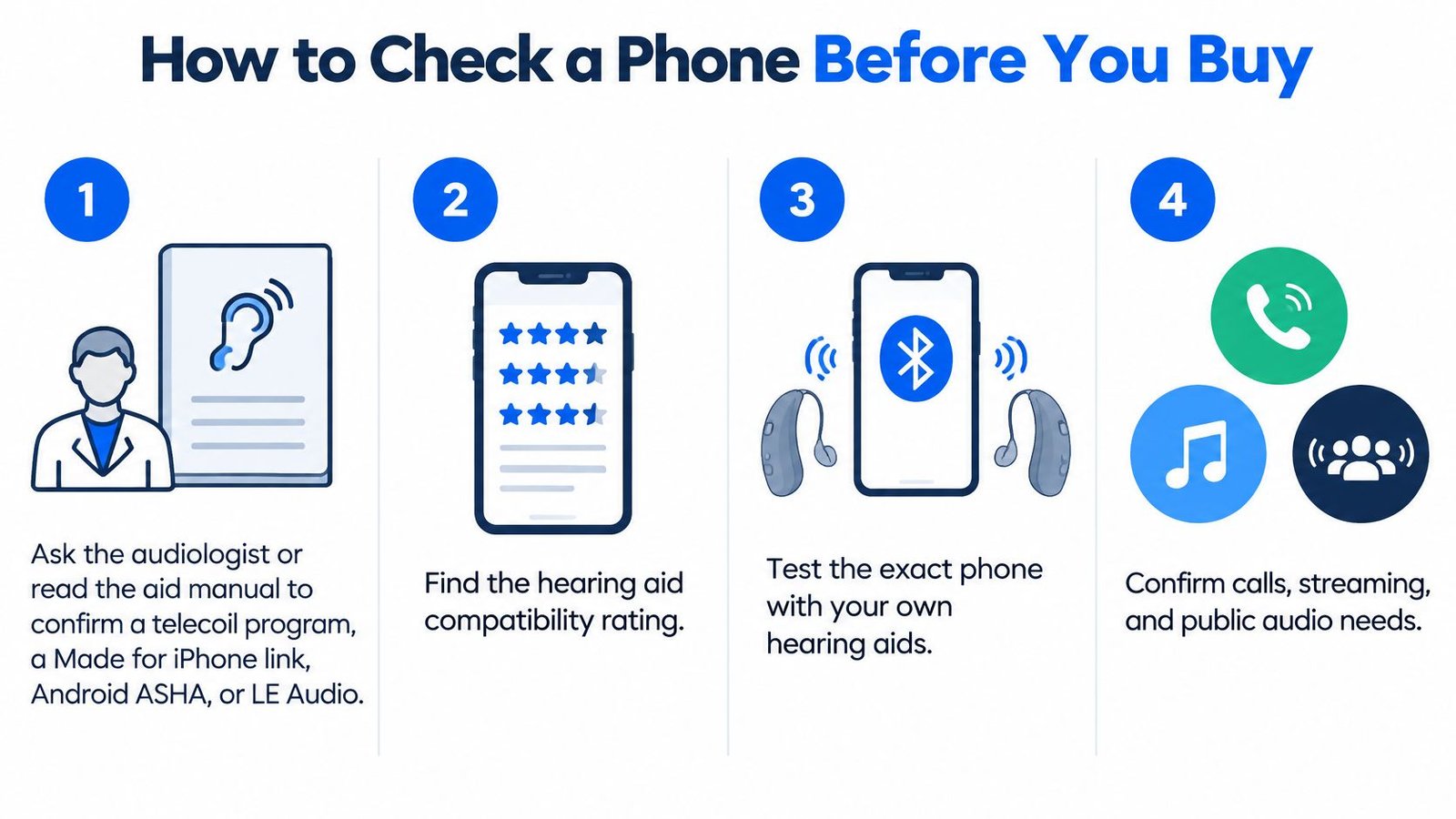
Check the listener's own devices, not a generic demo pair on the counter. Before the first step, look for a printed M and T label on the box, or the HAC statement on the maker's accessibility page, so you know which result you are comparing. A newer phone may list a 2019 ANSI outcome instead of M3 or T4. Write down whether telecoil coupling was tested.
Seven checks, in order
- Confirm the aid's real programs. Ask the audiologist, or read the manual, for a telecoil program, a Made for iPhone link, Android ASHA, or LE Audio. Stop here if the aid has no coil and the phone's only claim is a T rating. That T number cannot create a coil.
- Match the statement to the program you use. Note M3 or T3, M4 or T4, or the newer ANSI result. A strong acoustic score does not prove the magnetic path, and the reverse is also true.
- Place a call on the program you will leave on. Start in microphone mode. If you have a telecoil, repeat the call in T or MT. A store associate's favorite setting is not your setting.
- Listen for buzz, dropouts, and feedback. Try the phone at the ear, then on speaker at arm's length. Feedback at the ear and a clean speakerphone call point to placement, not a dead battery.
- Pair Bluetooth once, the way you will live with it. The aid should switch into the stream without a second app you will abandon after the return window. If pairing needs a clinic visit every time, say so out loud before you pay.
- Repeat one call in a noisier spot. A quiet demo desk hides interference and room noise. Step toward the entrance, a TV wall, or a busy sidewalk and place the same call again.
- Write the failure mode in one line. Examples: no telecoil, no pairing, words still unclear. That line decides the backup. A second identical phone will not fix “words still unclear.” Captions or a loop might. If you are narrowing handsets for daily calls, this clear choice phone checklist keeps the comparison on the features you can verify in the store.
If the only problem left is unclear speech, do not keep swapping handsets that share the same rating. Change the channel you use to follow the words.
Bring the aid you wear, the program card if you have one, and enough battery for two calls. A dead aid makes every phone look incompatible.
When Ratings Still Leave Words Unclear
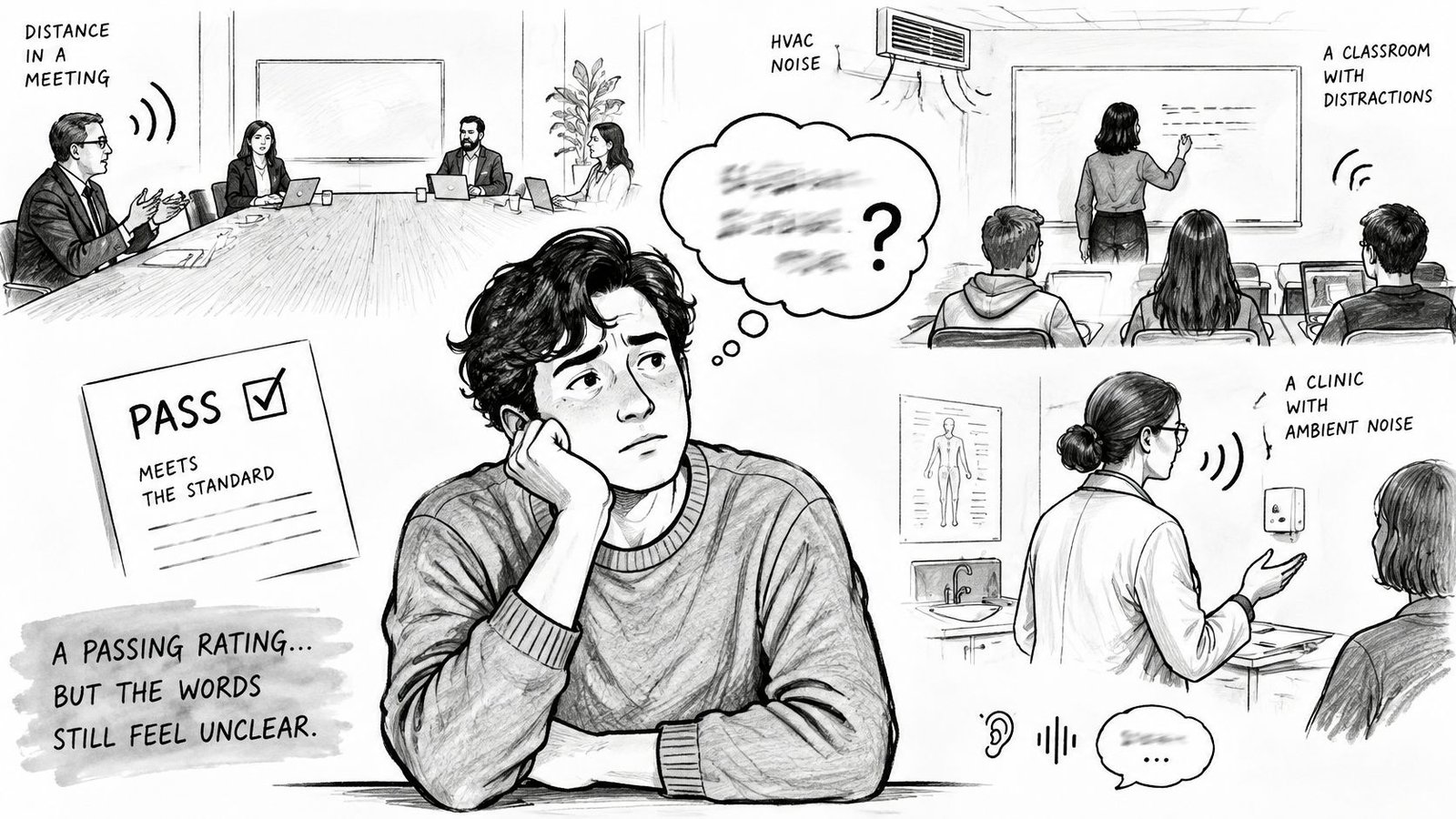
A handset rating measures interference, not how clearly you understand every speaker. In a meeting, the person across the table may be easy to follow while someone at the far end is not. Classrooms add HVAC hum and teachers who turn toward the board. In clinics, clinicians may face a screen while explaining results. Cafes add music beneath conversation, while sermons and group discussions can involve several voices at once.
Live captions turn recognized speech into text, giving you another way to follow a conversation. Apple's Live Captions are a separate accessibility feature, not a hearing aid compatibility rating. Apple's iPhone hearing accessibility guide says Live Captions can transcribe audio in apps such as FaceTime and Podcasts, and caption live conversation around you. Apple lists the feature for iPhone 11 and later when the primary language is English (U.S.) or English (Canada). Availability depends on the model, language, system version, and accessories. It is not a universal replacement for a hearing aid or a formal accommodation.
During an appointment, you might listen through your hearing aid and glance at captions when the clinician turns away. In a meeting, text can help confirm a name or phrase when another person joins. These are speech problems, which a missing M number cannot fix.
A caption app is not a handset rating
iScribe Live Transcribe is an accessibility tool designed for the d/Deaf and Hard of Hearing community, with live captions for face-to-face conversations, appointments, meetings, social events, and everyday interactions.
Text-telephone tools serve a different purpose on some calls. If a phone menu mentions TTY, learn what TTY means on iPhone to distinguish that setting from HAC labels and live captions. Use the aid with the handset setting that matches your program; use captions when speech in the room is difficult to follow.
Match the Handset and Add Captions
A compatible handset helps reduce interference; it cannot tell you whether speech will be clear in every room. Keep the phone's M or T rating matched to the hearing aid setting you use, and check the connection again after changing the case, phone software, or hearing aid. A rating is a useful starting point, not a promise about every conversation.
Rooms add their own challenges. Several people speaking, background noise, or someone facing away can make words hard to follow even when the handset rating matches. On-screen text can give you another way to check what was said.
iScribe Live Transcribe provides live captions for face-to-face conversations, appointments, meetings, social events, and everyday interactions. It supports more than 100 languages and variants, saves transcripts, and can create summaries, key points, and action items from conversations and recordings. Real-time transcription requires an internet connection. The free tier includes three transcriptions per day; the premium plan offers unlimited transcriptions and a seven-day trial. iScribe has a 4.7 rating and is trusted by thousands of d/Deaf and Hard of Hearing users.
Use captions alongside the hearing aid setting that suits your handset. For recorded video, closed captioning places text alongside the audio. Try captions during a conversation in a meeting, clinic, or cafe, then save the transcript if you need to review details later. iScribe Live Transcribe can provide that text on iPhone and iPad.