
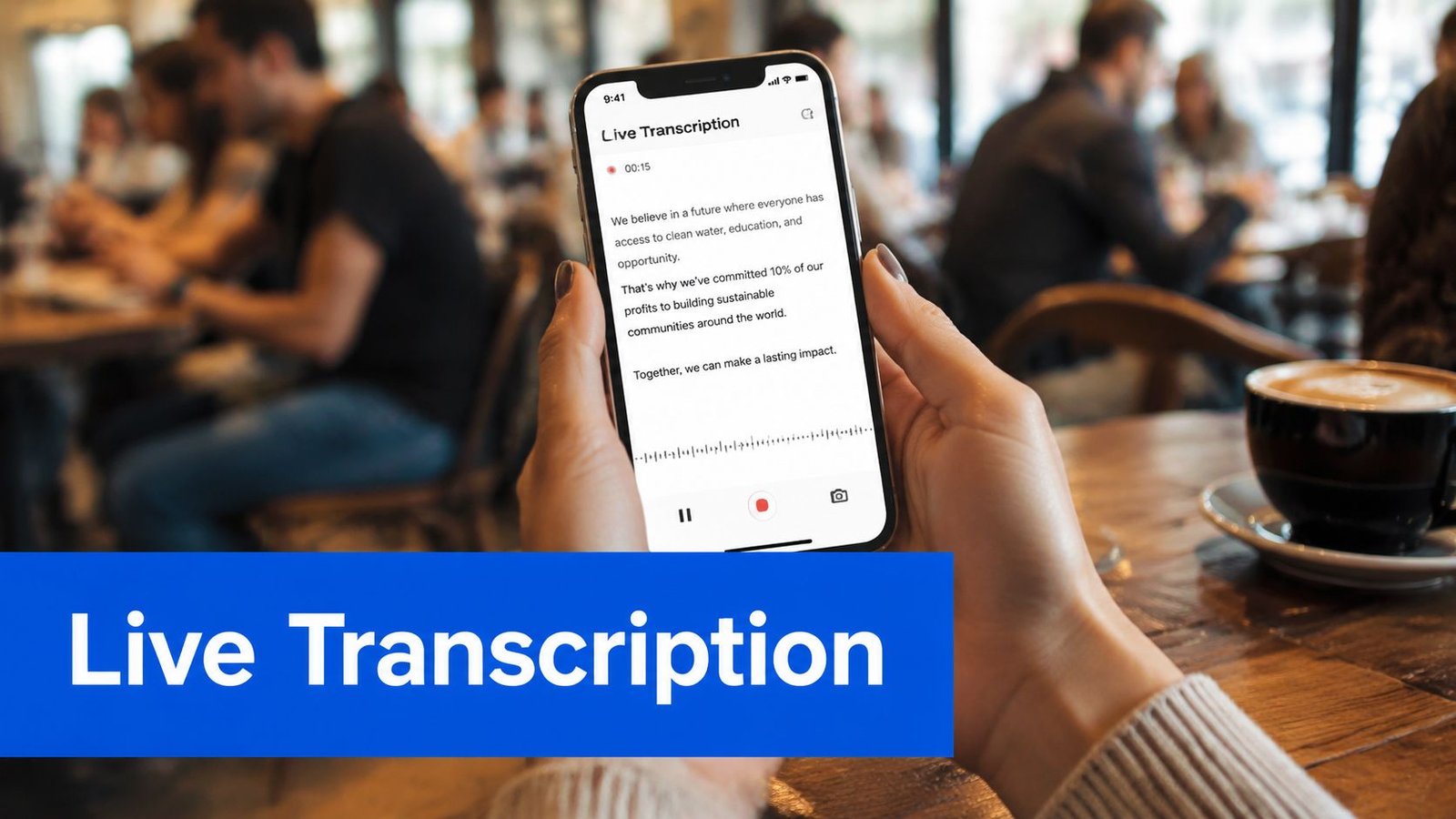
You're in a noisy coffee shop, trying to follow a conversation while the person across from you speaks over music, dishes, and nearby customers. You open a live transcription app on your iPhone, and words begin appearing on the screen almost as quickly as they're spoken. That smooth experience feels local, but much of the difficult work may be happening somewhere else.
That “somewhere else” is the cloud. In simple terms, cloud computing lets an app use remote servers, software, and storage through the internet instead of relying only on the phone in your hand. This cloud explained guide connects that invisible infrastructure to a practical question: how can a device turn speech into readable text quickly enough to support a real conversation?
Table of Contents
- What the Cloud Does for Your Apps
- The Three Service Models That Run Everything
- Why Cloud Adoption Grew So Fast
- How Cloud Powers Real-Time Transcription
- The Real Risks and Hidden Costs
- Cloud Transcription Versus On-Device Processing
- How to Evaluate Any Cloud-Powered App
What the Cloud Does for Your Apps
Your phone starts the process by capturing speech through its microphone. The app sends the audio, often in small pieces, across the internet to remote computers. Those computers run speech-recognition software, turn sound into text, and send the result back to your screen.
For a live captioning app, this exchange must happen quickly. Text can appear word by word while the speaker is still talking, which helps in lectures and conversations where following every spoken word or relying on lip reading may be difficult. Accessibility tools such as iScribe's audio transcription features show how remote processing can support everyday communication.
A useful mental model
The phone works like a front desk, while the cloud operates as a back office. Each part has a specific job:
- The phone listens: It captures audio and displays the words.
- The network carries information: It sends audio to remote systems and returns the text.
- Cloud servers process speech: They run models that identify words, accents, languages, and speech patterns.
- The app presents the result: It formats the returned text so you can follow the conversation.
The phone remains responsible for the microphone, interface, local controls, and parts of the connection. The cloud can supply more computing capacity than a single mobile device can reasonably dedicate to a large speech model. That extra capacity can affect caption latency, recognition quality, and the app's usefulness during a real conversation.
An active internet connection is therefore part of the experience. If the phone cannot reach the remote service, the app may be unable to convert new audio into live text. The cloud is a network of data centers filled with computers that companies operate or rent for tasks such as transcription, storage, search, and video delivery.
The Three Service Models That Run Everything
Cloud services differ mainly in who manages the technical layers and how much control the customer keeps. The same transcription app can feel simple to a user while relying on several layers that a provider manages out of sight.
| Service Model | Provider Manages | Customer Controls | Typical User |
|---|---|---|---|
| IaaS | Physical servers, networking, and virtualization | Operating systems, applications, configurations, and data | Infrastructure and engineering teams |
| PaaS | Infrastructure plus the managed development environment | Application code, data, and selected settings | Software developers |
| SaaS | Infrastructure, platform, application, maintenance, and delivery | Account settings, content, and user permissions | Consumers, businesses, and app users |
Infrastructure as a Service, or IaaS, gives a company virtual servers, storage, and networking as building blocks. Its team installs software and controls much of the operating environment. A custom service might use IaaS when its engineers need detailed configuration options.
Platform as a Service, or PaaS, provides a managed environment for building and running applications. Developers supply application code and data, while the provider handles more of the underlying systems. This can reduce server administration without removing control over how the product works.
Software as a Service, or SaaS, delivers a finished application through a browser or app. The provider operates the application, maintains its infrastructure, and manages updates. The customer typically controls the account, content, and permissions rather than the servers.
What the models mean for a live transcription app
An iScribe-style transcription experience is usually SaaS from the user's perspective. The user opens the app, grants microphone access, chooses the required function, and reads the returned text. The product may depend on cloud speech-recognition services, databases, authentication systems, and storage, even though those components remain invisible on the screen.
That division affects daily usability for deaf and hard-of-hearing users. The provider's choices about processing systems can influence caption latency and recognition accuracy. A delay of only a few moments can make it harder to follow a fast conversation, while errors in names or speech patterns can change the meaning of a caption.
The service model also defines responsibility. SaaS removes server setup from the user, but gives the provider more control over data handling, updates, availability, and system configuration. Users should review the app's privacy information, understand what it stores, and check whether an internet connection is required.
Practical rule: The easier an app feels to use, the more technical responsibility has usually moved from the user to the provider.
Why Cloud Adoption Grew So Fast
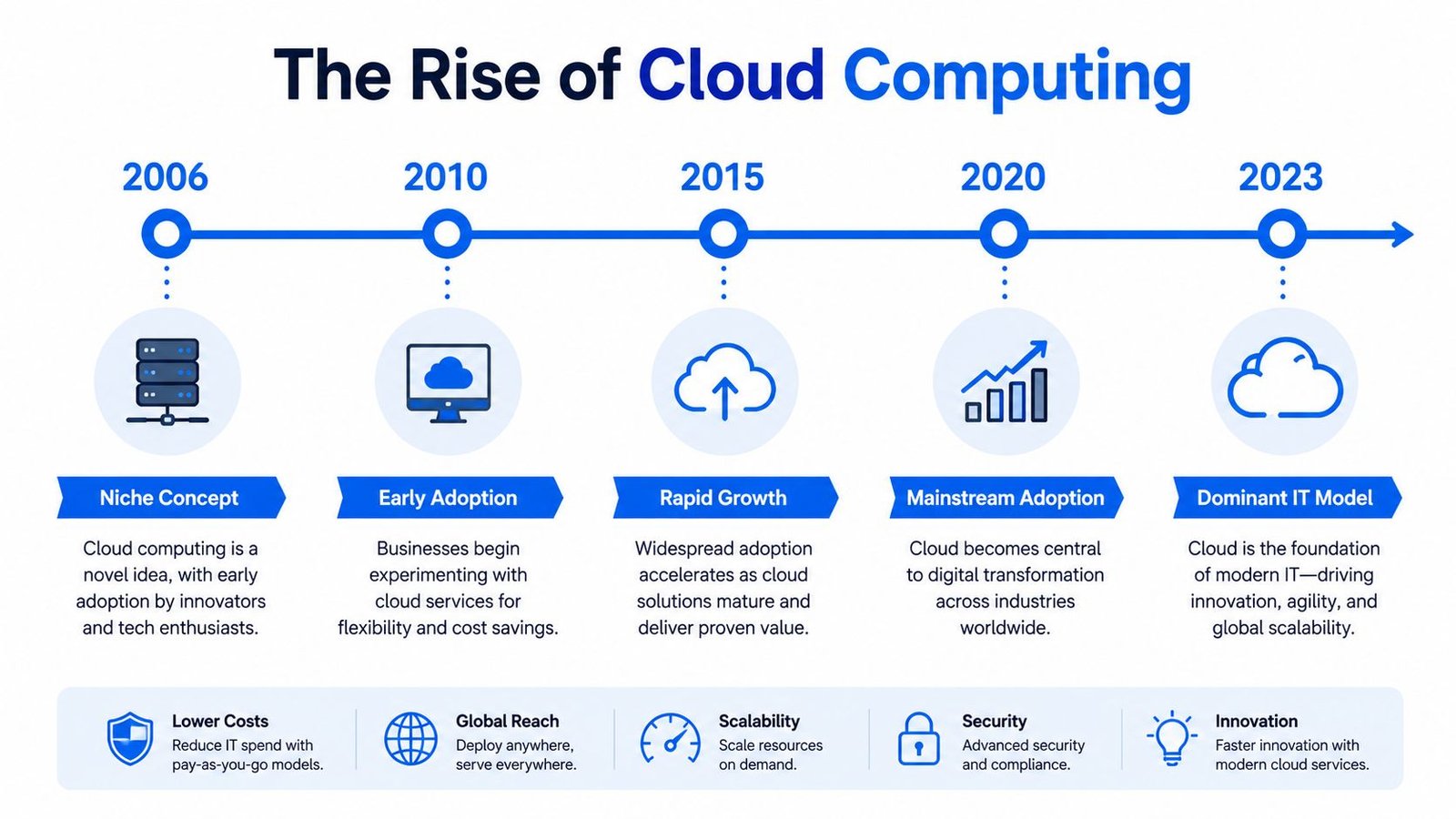
Suppose an accessibility app must support a sudden rush of users during a busy event. Its provider can add computing capacity without installing a separate server for every person. That ability helps explain why cloud computing moved from a niche idea to a dominant IT model in just over a decade.
The term's widely cited history reaches back to 1996, when George Favaloro of Compaq coined it. Virtualization during the 1990s supplied another foundation for modern cloud infrastructure. This history appears in the cloud computing timeline and market overview from Brightlio.
Virtualization lets one physical computer provide separate, software-based computing environments. Providers can therefore share hardware while offering computing capacity more flexibly than the traditional approach of buying and maintaining dedicated equipment for every application.
The economic shift mattered just as much. Organizations no longer need to purchase a large server fleet before demand is clear. They can rent resources and adjust capacity as usage changes, supporting software delivery, data storage, analytics, and enterprise planning.
Adoption changed the default
Cloud is no longer mainly a backup location. A 2026 industry summary reports that 94% of enterprises use cloud services, 89% use a multicloud strategy, and 59% use multiple public clouds. It also says more than 60% of corporate data is stored in the cloud. Worldwide end-user spending on public cloud services reached $723.4 billion in 2025, compared with $595.7 billion in 2024, a 21.5% increase, according to Finout's 2026 cloud statistics summary.
A separate market-growth section of the Brightlio report places the cloud computing market at about $156 billion in 2020 and $913 billion in 2025, nearly six times larger over five years, as described in Brightlio's market summary.
For an app such as iScribe, this growth can mean access to shared processing capacity and infrastructure that supports daily use across many devices. The benefits still require careful management. Cloud systems can scale, but added resources need monitoring. They can support global services, but network dependencies affect responsiveness. Lower upfront hardware spending can also lead to significant usage and data-movement costs.
How Cloud Powers Real-Time Transcription
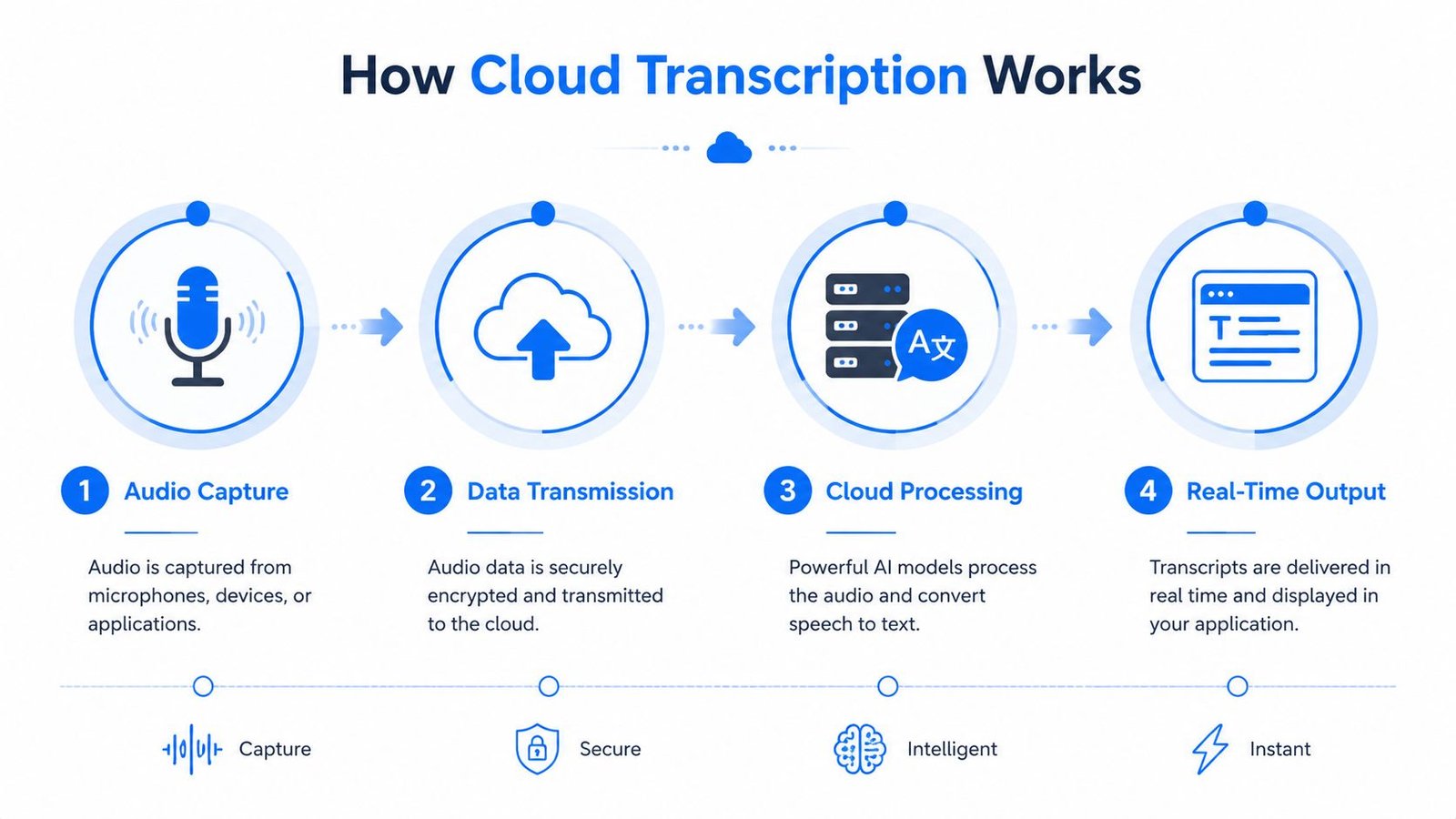
Cloud transcription follows a simple chain. Your device captures speech, sends audio for processing, receives text, and displays that text for you to read.
The path from voice to words
- Audio capture: The phone's microphone records the speaker.
- Data transmission: The app sends audio fragments through the internet.
- Cloud processing: Remote systems analyze sound and predict the words being spoken.
- Real-time output: The service returns text, and the app places it on the screen.
This is a form of real-time processing for audio, where the system handles incoming sound continuously rather than waiting for a complete recording. The linked explanation from Isolate Audio's real-time processing resource provides useful background on that workflow.
The output isn't instantaneous. A study of classroom captioning reported a delay of less than five seconds, with measured latency of 3.87 seconds, as documented in the Carnegie Mellon University classroom captioning study. For a user, that delay can still feel live because words arrive while the speaker continues.
Why network quality matters
Latency means the time required for information to travel and return. In distributed systems, measured round-trip times for same-zone traffic have included a p50 of about 362 microseconds and a p95 of roughly 597 microseconds. Cross-zone traffic in the same measurements showed a p50 of about 420 microseconds and a p95 of roughly 669 microseconds, according to Evan Jones's network latency analysis.
Those server-to-server figures aren't the same as the full delay a user experiences. Your audio still passes through the phone, local network, internet connection, cloud service, recognition model, and app interface. Each dependency can add delay, especially when the network is unstable or the system is busy.
Cloud infrastructure makes broad language coverage practical. Amazon Transcribe announced support for over 100 languages in a next-generation automatic speech-recognition system, as described by Amazon Web Services. Meta's SeamlessM4T was reported to transcribe and translate close to 100 languages, while its underlying speech framework covered more than 1,100 languages, according to TechCrunch's coverage.
Captions need both accuracy and timing. Text that arrives late can be difficult to follow, even when the words are correct.
For a deaf or hard-of-hearing user, this difference affects daily situations such as a lecture, meeting, restaurant conversation, phone call, travel interaction, or appointment. Cloud processing supplies powerful recognition, but connectivity remains part of the user experience. More detail is available in this guide to real-time transcription software.
The Real Risks and Hidden Costs
Cloud computing isn't automatically cheaper, and it isn't automatically safer. It changes where costs and responsibilities sit.
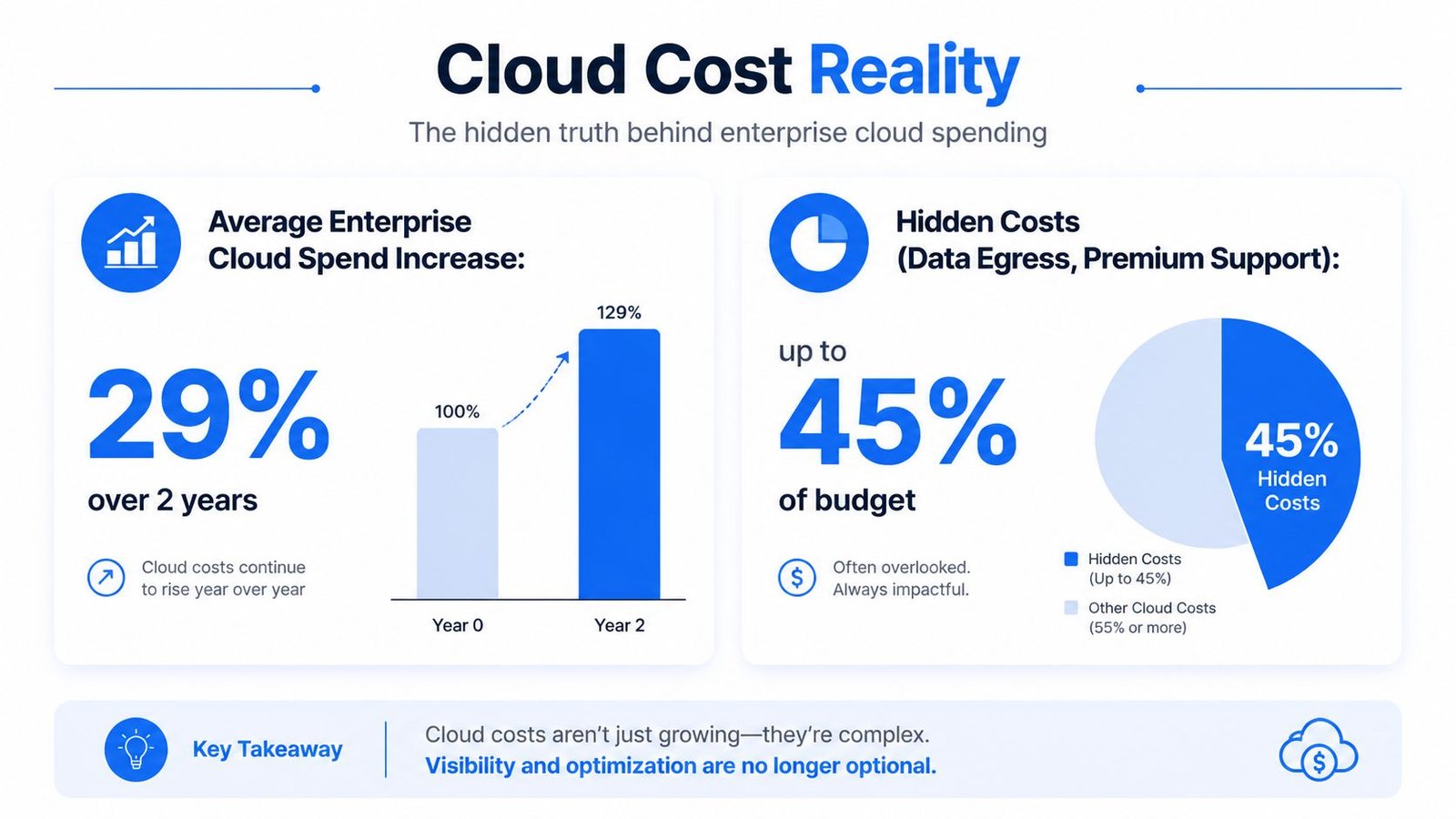
The scale of spending makes that clear. Enterprise cloud infrastructure spending reached about $129 billion in Q1 2026, according to MedhaCloud's cloud security statistics overview. Cloud can reduce the need to buy and maintain physical hardware, but organizations still pay for compute, storage, networking, monitoring, support, backups, security controls, and engineering time.
Where unexpected costs appear
Egress charges are fees associated with moving data out of a cloud provider's environment. A team may upload recordings or application data cheaply, then face additional expense when it moves large volumes to another provider, region, or private system.
FinOps is the practice of managing cloud spending through shared accountability between finance, engineering, and product teams. It asks practical questions: Which resources are active? Who owns them? Does a service need its current capacity? Would storing every transcript indefinitely create unnecessary expense?
A cloud bill can grow because teams leave unused resources running, duplicate data across environments, select premium services without review, or move information repeatedly between systems. The cloud gives organizations flexibility, but flexibility without governance becomes waste.
Security is an orchestration problem
The shared-responsibility model means the provider secures parts of the underlying cloud infrastructure, while the customer remains responsible for areas such as identities, configurations, application code, and data handling. The exact division varies by service, but the customer never transfers every security decision to the provider.
The harder problem often appears in mixed environments. Recent breach analyses cited in a 2026 summary place the average cost of multi-environment breaches above $5 million, with identification and containment taking 283 days, according to CNI's cloud security statistics.
That pattern matters because a modern organization may connect cloud services, on-premises systems, SaaS tools, identity platforms, and third-party applications. An error in one environment can affect another through shared credentials, APIs, data flows, or permissions.
For a transcription product, responsible design includes limiting access to recordings, protecting transcripts, explaining retention, and handling connection failures clearly. Users should also understand what happens to audio after processing. A practical companion for the user side is this guide on removing background noise from audio, because clearer input can make live transcription easier to follow without treating cloud processing as a guarantee of perfect output.
Cloud Transcription Versus On-Device Processing
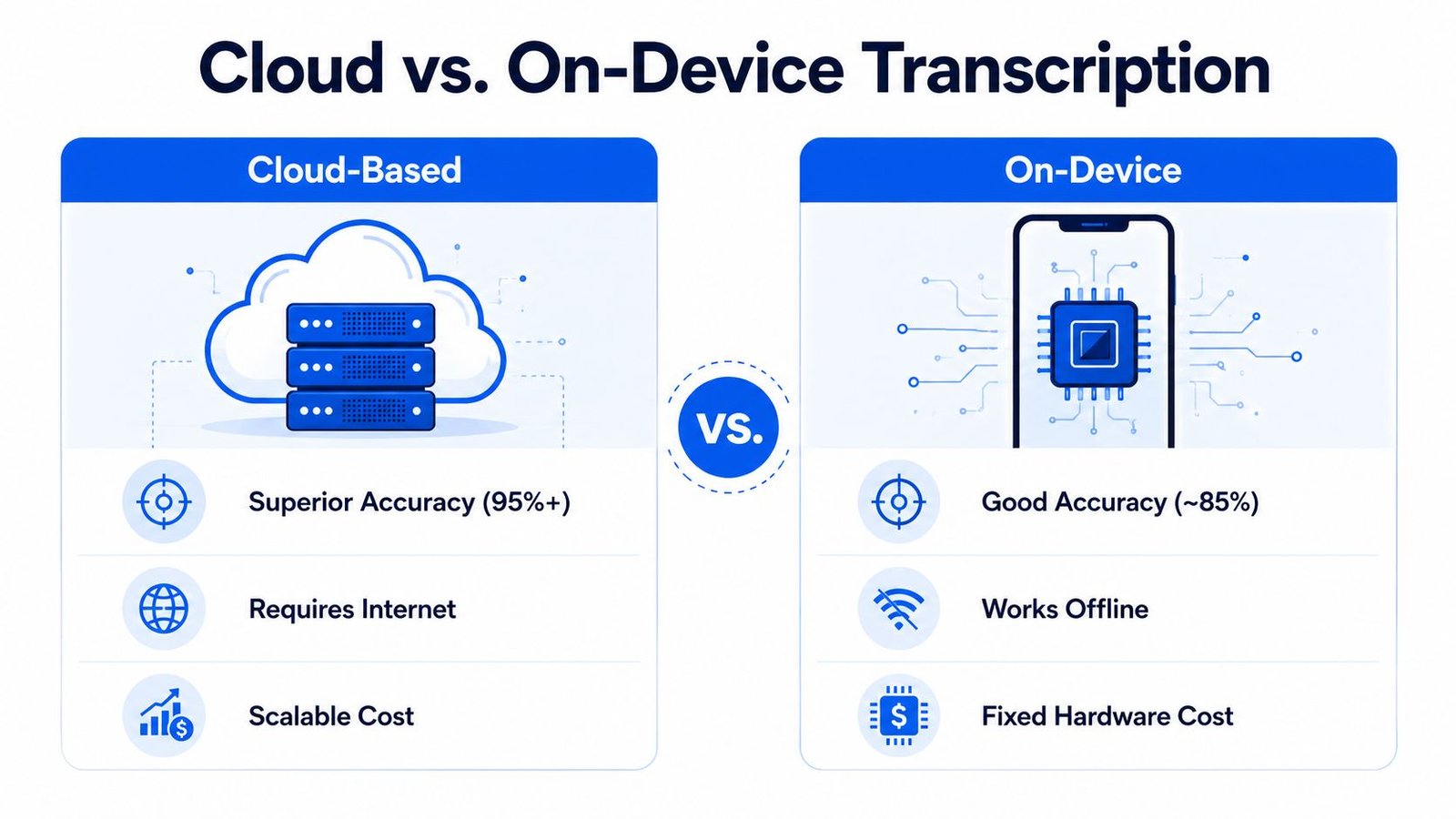
Cloud and on-device transcription solve different problems. Cloud processing sends audio to remote infrastructure, where the service can use larger models and centralized updates. On-device processing keeps recognition on the phone or tablet, which can support offline use and reduce dependence on network travel.
| Consideration | Cloud-based processing | On-device processing |
|---|---|---|
| Connectivity | Usually requires an active internet connection | Can work without a network when the model is installed |
| Computing capacity | Uses remote infrastructure that can support larger models | Limited by the device's processor, memory, and storage |
| Language support | Can draw on centrally managed multilingual services | Depends on the languages and models available locally |
| Latency | Includes network travel and remote processing | Avoids network travel, though device processing still takes time |
| Updates | Provider can update models centrally | Updates may require downloading new local models |
| Privacy control | Audio or text may leave the device | Data can remain local, depending on the app |
Cloud systems make sense when you need broad language coverage, powerful recognition, or transcription of uploaded audio and video. They also suit users who want saved transcripts and later summaries in one connected service.
On-device processing is more attractive in places with poor connectivity, during travel without reliable service, or when keeping audio local is a priority. Its trade-off is that a phone has finite processing power and storage, so the local model may offer fewer capabilities.
The best choice depends on the occasion. A professional meeting may favor cloud capacity and saved records. A conversation in an area with unreliable service may require an offline option or a backup plan. You can explore the broader workflow in this guide to converting sound to text.
How to Evaluate Any Cloud-Powered App
Use five questions before trusting a cloud-powered app for an important conversation or record:
- What service model is it? SaaS usually means the provider manages most infrastructure, while you manage account settings, content, and permissions.
- Does it need the internet? Test the app where you expect to use it, especially in classrooms, restaurants, travel settings, and large meetings.
- What leaves your device? Check whether the service sends audio, stores transcripts, or keeps files for later access.
- Who can access the data? Look for account controls, sharing settings, retention information, and clear privacy documentation.
- What happens when the connection fails? A trustworthy accessibility workflow should make the failure visible and give you a practical alternative.
For technical teams comparing infrastructure providers, a cloud provider decision guide can help organize questions about service capabilities and operating trade-offs. For everyday users, the same principle applies: don't judge an app only by its interface. Judge the complete path from spoken sound to displayed text, including connectivity, privacy, storage, and recovery.
Cloud explained means understanding that the screen is only the visible part of the product. The remote systems, network path, data policies, and operating costs shape whether an app feels dependable.
iScribe Live Transcribe offers live, word-by-word captions for face-to-face conversations on iPhone and iPad, along with saved transcripts, recorded-audio transcription, readability controls, and AI-generated summaries. Visit iScribe Live Transcribe to see how a cloud-powered accessibility app can support conversations, meetings, lectures, and everyday note-taking.