
You arrive at a lecture with a laptop open, a notebook ready, and every intention of keeping up. Ten minutes later, the professor has moved from a definition to an example, then to a question from the back row. Your page is full, but you can't tell which ideas matter, what you missed, or how you'll study from it later.
Taking notes in lectures works best as a workflow, not a race to capture every word. You need a plan before class, selective notes during class, and a careful review afterward. Live captions, saved transcripts, and AI summaries can support that process, but they should add coverage and structure rather than replace your attention or judgment.
Table of Contents
- Why Most Lecture Note Strategies Fall Short
- Handwritten, Typed, and Transcribed Notes Compared
- The Before, During, and After Lecture Workflow
- Choosing a Note Structure That Fits the Class
- Using Transcripts and AI Summaries After Class
- Lecture Note Accessibility for Deaf and HoH Students
- A Simple Checklist for Your Next Lecture
Why Most Lecture Note Strategies Fall Short
A student can leave class with several full pages and still lack usable notes. Copying slide text and recording nearly every sentence makes the page look thorough, while the main argument, supporting evidence, and unanswered questions disappear inside raw detail.
The problem is the speed of the task. During a fast explanation, you are listening, judging importance, writing, and organizing at the same time. A 1977 empirical study of college lecture note-taking found that students missed nearly half of the material lecturers did not write on the board, compared with only 12% of material written on the board. The study also connected note completeness with course grades for material not placed on the board. Completeness fell as the lecture continued, indicating fatigue. Read the original lecture note-taking study.
The hidden cost of treating notes as one task
One live task requires you to understand an idea, decide whether it matters, record it, and phrase it clearly enough for later study. That workload becomes harder when an instructor speaks quickly, introduces unfamiliar terms, changes slides, or answers several questions in succession. A student who focuses on perfect wording may miss the next explanation, while a student who captures everything may lose the structure of the lesson.
Separate the work across the lecture cycle:
- Before class: Establish context by reviewing the topic, previous notes, and questions.
- During class: Capture claims, evidence, definitions, examples, and uncertainties. Live captions or a transcript can preserve terms and discussion that your hands miss.
- After class: Compare your notes with the transcript, fill gaps, verify details, and use AI to summarize or group ideas. Check the output against the lecture rather than treating it as an unquestioned record.
Notes support recall only when you can interpret them later. A synthesis of 56 note-taking studies reported a benefit in 33 studies, or 59%, no difference in 21 studies, or 37%, and a detrimental effect in 2 studies, or 4%. Review the study synthesis.
Digital tools provide coverage, with a trade-off. A transcript preserves the wording, but an unedited transcript is difficult to study. If you are comparing paper, a tablet, and an app, the Tinymoose guide to digital note-taking offers a practical way to compare device-based workflows.
Practical rule: Your live notes should explain what you understood. Your transcript should protect details you could not capture.
Handwritten, Typed, and Transcribed Notes Compared
The medium changes the kind of thinking your notes encourage. Handwriting usually forces selection because you can't reproduce a lecture at speaking speed. Typing offers more room and faster capture, but it can tempt you to copy sentences without deciding why they matter. Transcription provides the broadest record, though it still needs checking and editing.
Research comparing handwriting and typing found higher retention scores for typed notes in that study, with an overall mean of 11.84 for typed notes versus 10.51 for handwritten notes. The lowest scores occurred when participants handwrote notes during a lecture. Examine the handwriting and typing research. That result doesn't turn typing into a universal winner. It shows why you should judge a method by the entire workflow, including how actively you listen and what you do afterward.
| Factor | Handwritten Notes | Typed Notes | Transcribed Notes |
|---|---|---|---|
| Speed | Slower, which encourages summarizing | Fast, with a risk of verbatim copying | Captures speech continuously |
| Retention support | Requires active selection and phrasing | Can support organization and search | Requires review and personal interpretation |
| Coverage | Usually limited to key ideas | Can include slides, terms, and details | Includes lecture flow, questions, and side comments |
| Best use | Diagrams, formulas, and selective thinking | Structured lectures and searchable records | A safety net for missed words and later review |
| Main trade-off | You may miss details | You may type without processing | Errors can affect names and technical vocabulary |
A controlled lecture study also found that note-takers remembered significantly more content than a listen-only group. The note-taking group had a mean retention score of 19.09 on a 28-question multiple-choice exam. See Cornell's note-taking resources and study discussion.
Why a hybrid method is usually more practical
Use your own notes for meaning and a transcript for coverage. For example, during a biology lecture, you might write, “cell membrane controls movement through selective permeability,” then rely on the transcript to recover the professor's example or a term you couldn't spell.
The transcript is raw material. Search it for a phrase, check it against the slide, and move the verified detail into your outline or Cornell page. Resources about AI audio transcription apps can help you understand how transcription fits into a broader study system, but no app removes the need to check the output.
The Before, During, and After Lecture Workflow
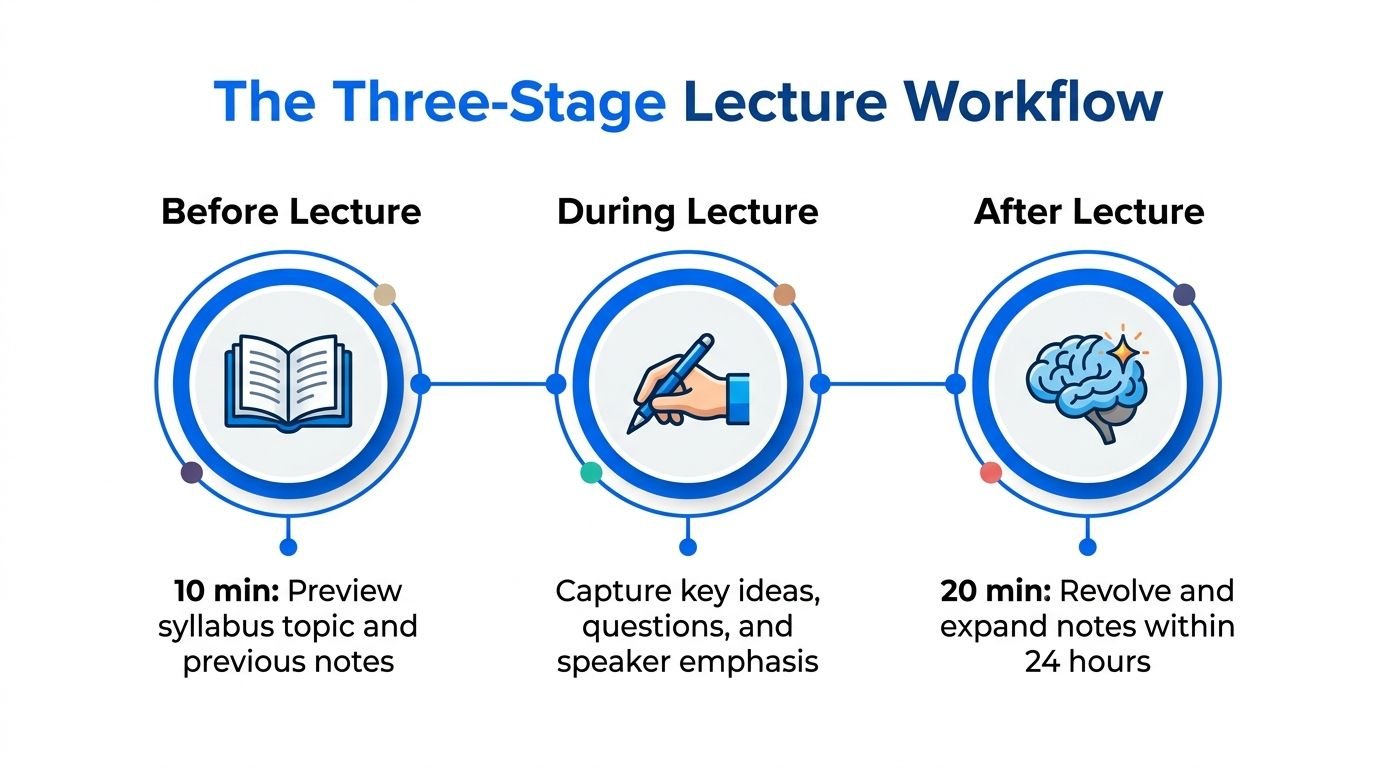
Effective note-taking starts before the professor begins speaking. A short preview gives your brain places to attach new information, so unfamiliar terms don't arrive as isolated sounds.
Before lecture
Spend 10 minutes preparing. Review the syllabus topic and your previous lecture notes. Skim the assigned reading headings, then write two or three questions you want the class to answer.
Set up a page or digital template with:
- The date and course name
- The unit or lecture title
- A one-line learning goal
- Space for main notes
- A margin for questions and unclear terms
Don't try to predict every detail. You only need enough context to recognize the lecture's direction.
During lecture
Treat the page as a working document, not a transcript. Capture the main claim, the supporting example, and any definition, formula, or transition the instructor emphasizes. Use arrows for cause and effect, question marks for uncertainty, and stars for points that seem likely to need review.
If captions are available, glance at them when the pace spikes or a technical term appears. Real-time classroom captioning can show speech with a delay of less than five seconds, so it isn't instantaneous. Review the classroom captioning research. Keep your own notes focused on interpretation while the transcript acts as a safety net.
You can also explore guidance on the best voice recorder and transcription app. In this context, Live Transcribe iSrcribe is listed as an app that lets users see what's being said.
After lecture
Review within 24 hours. Compare your notes with the transcript, fill missing terms, and correct anything you misunderstood. Then write five plain-language sentences at the bottom of the page explaining the lecture's argument.
Save the final notes, verified transcript, and any AI summary in a clearly named course folder. This small filing habit makes the material searchable before exams and prevents the transcript from becoming a forgotten audio artifact.
Choosing a Note Structure That Fits the Class
No single format fits every lecture. A discussion-heavy seminar, a chemistry demonstration, and a history survey place different demands on your page. Choose the structure that matches the material and your purpose, then change it when the lecture changes.
| Method | Best For | Main Advantage | Trade-Off |
|---|---|---|---|
| Cornell | Definitions, arguments, and causal relationships | Prompts and summaries make review active | Requires preparation and follow-up |
| Outline | Lectures with clear topics and subtopics | Shows hierarchy and logical order | Can become awkward with diagrams |
| Verbatim transcript | Complete coverage and later searching | Preserves wording, questions, and details | Raw text can hide the main idea |
Cornell notes for review
The Cornell Note-taking System uses five actions: Record, Questions, Recite, Reflect, and Review. The page separates notes from prompts and a summary, which makes it useful when you need to test yourself rather than just reread.
Cornell's review guidance recommends at least 10 minutes each week for review. See Cornell's Learning Strategies Center guidance. During an economics lecture, you might place “Why do prices rise?” in the cue column, record the explanation on the right, and write a short conclusion below.
Outline notes for organized lectures
Use a heading for the main topic, then indent causes, examples, and evidence beneath it. If the professor says a market shift has “three causes,” write that transition clearly. Later, you can turn each cause into a practice question.
Transcripts for coverage
A transcript can preserve the full sentence, including a detail you didn't have time to write. Don't let it become your primary structure. Mark the instructor's definition of demand, connect it to the relevant slide, and keep the complete transcript available for verification.
Science classes often need labeled drawings and equations. History may work better with columns for argument and evidence. Test your chosen format for the first part of class, then adjust if information arrives out of order.
Using Transcripts and AI Summaries After Class
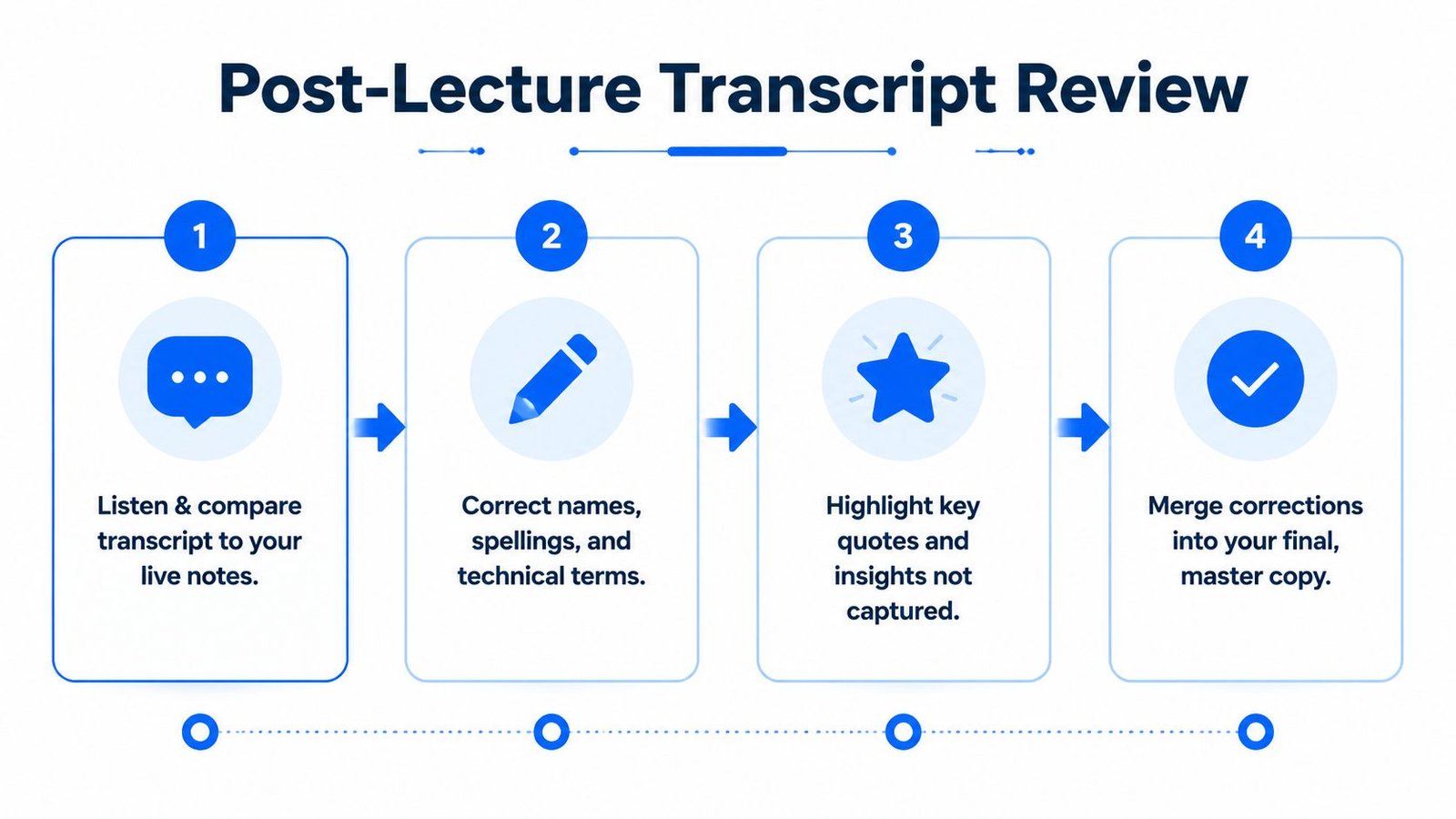
A transcript is an accuracy layer, not a finished study guide. Start by comparing it with your original notes while the lecture is still familiar. Check names, dates, formulas, technical terms, and transitions, especially where the speaker was far from the microphone or several people talked at once.
Read the transcript once to restore the lecture's sequence. Then return to your own notes and preserve the ideas you noticed in real time. Your final copy should combine the transcript's coverage with your interpretation, not erase your thinking under a block of generated text.
Give AI a narrow job
AI can help draft key points, group related topics, generate review questions, and identify disagreements between your notes and the transcript. It should work from the supplied lecture material and clearly separate what the instructor said from any inference.
A useful instruction might ask the system to:
- Extract definitions and examples only from the transcript and slides.
- List statements that need verification.
- Create questions without adding outside facts.
- Identify where your notes and transcript differ.
A guide to the best AI meeting summary tool for teams offers useful context for summary workflows, even though a classroom has different privacy and learning needs.
Verify, then consolidate
Check generated claims against the recording, slides, or instructor's materials. If a group discussion is unclear, ask the instructor or consult the assigned reading. Don't treat fluent wording as proof of accuracy.
You can also convert audio files to text when you need to review a recorded lecture. Store or delete transcripts according to your institution's rules, and avoid uploading sensitive student discussions without permission.
Study standard: AI may organize your material, but you remain responsible for deciding whether the material is correct.
Lecture Note Accessibility for Deaf and HoH Students
Consider a Deaf student in a fast economics lecture. The slides show charts, the instructor moves between examples, and students ask questions from different parts of the room. A caption feed can provide access to spoken language, but it can't automatically describe a graph, a gesture, or a change written on the board.
Before class, the student should obtain accessible materials, confirm whether captions or a transcript will be available, and choose a seat with a direct view of the speaker and display. They can also prepare a note template with fields for the slide number, speaker, timestamp, and follow-up question.
Captions need visual context
During class, the student can adjust text size, choose a readable font, and use contrast settings that make the feed easier to follow. The transcript should connect to structured notes, not compete with them. For example:
- Slide reference: Demand curve shifts right.
- Captioned explanation: The instructor connects the shift to increased consumer income.
- Question log: A student asks whether the pattern applies to luxury goods.
- Follow-up: Verify the answer after reviewing the transcript and slide.
A live feed may miss specialized vocabulary, overlapping speech, or audience questions. Captioning guidance also notes that live captioning can depend on a good internet connection and is commonly treated as an accommodation. Review university guidance on in-class disability support. For broader background on hearing-related topics, readers can consult veterans hearing loss statistics, while keeping in mind that lecture access requires an education-focused plan.
Build an equivalent access plan
After class, compare the saved transcript with the slides and personal notes. Use a verified transcript as the input for review questions, then record any missing group discussion as a follow-up note. If the room acoustics or speaker overlap creates repeated gaps, an approved human transcriber or note-taker may still be necessary.
Instructors can help by repeating audience questions, describing visual information aloud, sharing materials ahead of time, and confirming the student's preferred communication method. The aim is equivalent access to the lecture's content, not just placing more text on a screen.
Resources on speech-to-text apps for Deaf students can help students compare captioning workflows, but the right accommodation should be confirmed through the school's disability-support process.
A Simple Checklist for Your Next Lecture
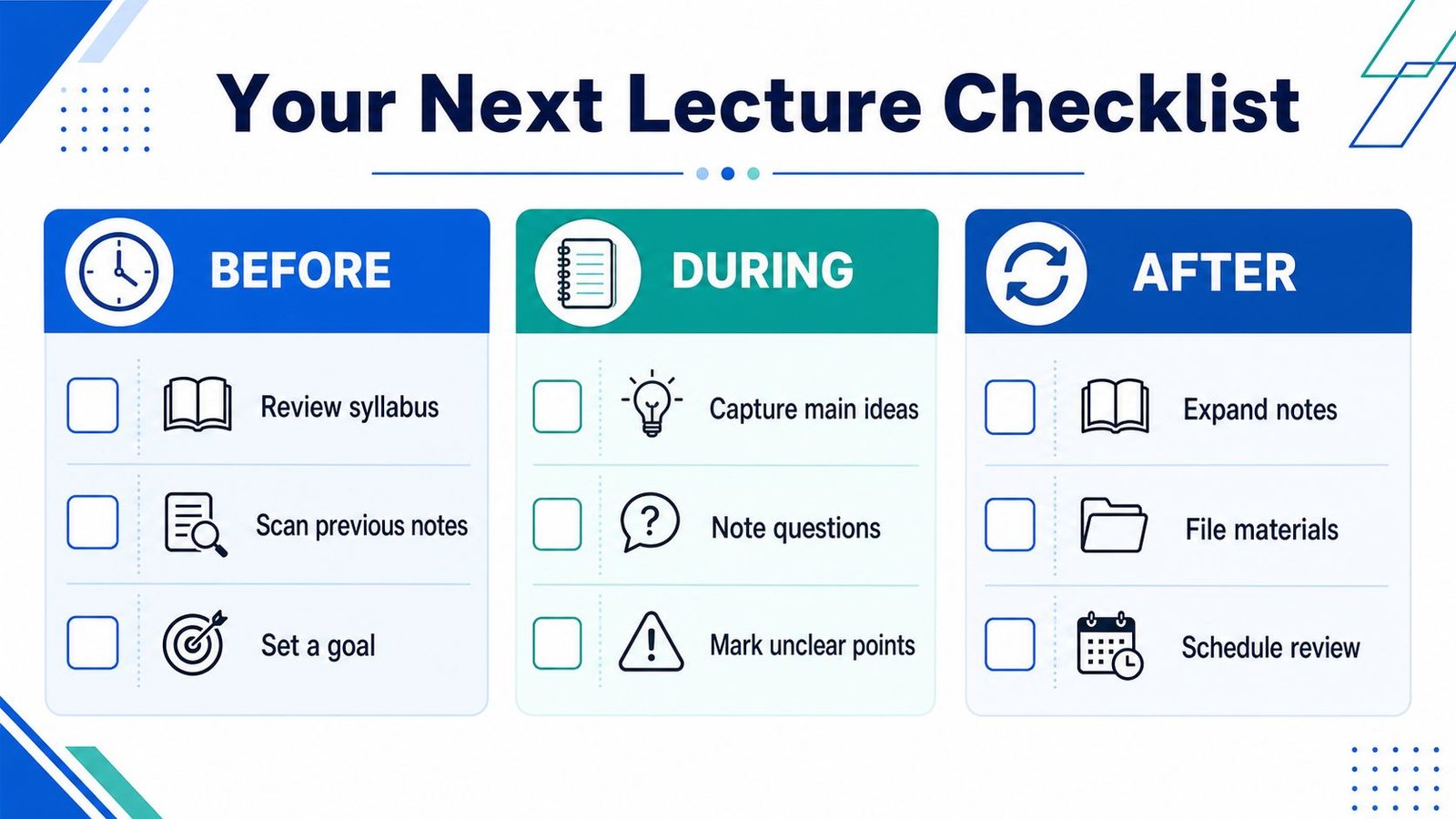
Use this checklist as a flexible prompt, not a rulebook. It protects the three moments that matter most: preparing your attention, capturing meaning, and reviewing before details fade.
Before lecture
- Preview the syllabus: Identify the topic so new terms have context.
- Scan previous notes: Find the last unanswered question and carry it forward.
- Set a learning goal: Write what you want to understand by the end.
- Open your tools: Load the note template and captioning app if you use one.
During lecture
- Capture main ideas: Write claims and supporting examples in your own words.
- Mark unclear points: Use a question mark, timestamp, or highlighted caption.
- Record speaker emphasis: Note repeated terms, board content, and explicit transitions.
- Save the raw transcript: Keep it with the date and lecture title for later checking.
After lecture
- Fill gaps from the transcript: Recover details without rewriting every sentence.
- Correct technical terms: Check names, formulas, and definitions against course materials.
- Run a constrained AI review: Ask for key points and questions from verified material only.
- Create five recall questions: Test yourself instead of reading passively.
- File the final copy: Store notes, transcript, slides, and summary together.
For Deaf and Hard of Hearing students, add a specific check after class: review moments where captions missed group discussion, identify who spoke, and request clarification when the answer isn't recoverable from the recording.
The minimum viable checklist
On a difficult day, do three things:
- Write the lecture topic and one question before class.
- Capture the main claim and mark anything you miss.
- Review the notes with the transcript within 24 hours.
That small version still protects comprehension. You can expand the system when time and energy allow.
iScribe Live Transcribe converts live speech into on-screen text on iPhone and iPad, saves transcripts for later review, and can create AI-generated summaries from conversations and recordings. Visit iScribe Live Transcribe to see whether its live captions and post-lecture review workflow fit the way you take notes.